7 Best MCP Clients to Unlock the Full Potential of AI Agents
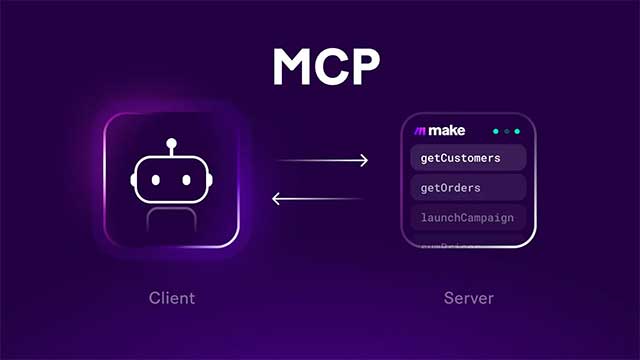
Model Context Protocol (MCP) is rapidly becoming the new connectivity standard across the AI ecosystem. In just a short time, major players like Meta, Hugging Face, Anthropic, OpenAI, and Microsoft have jumped in to develop or support the standard. What's really telling? Hackathons are now entirely focused on building MCP Servers, MCP Clients, and extensions—a clear sign that MCP is becoming the foundation for the next generation of intelligent AI agents.
Here's the simple breakdown: MCP Servers are programs or APIs that let AI safely access external tools—databases, file systems, web services, or specialized software. MCP Clients, on the other hand, are applications that connect to those servers, allowing users or AI agents to tap into thousands of different tools from a single unified interface.
The good news? Using MCP isn't complicated anymore. Most MCP clients only need a few configuration lines to connect with open-source MCP servers. Below are seven standout MCP clients for AI developers and programmers looking to build smarter applications.
Claude Desktop – The Go-To Choice for Exploring the MCP Ecosystem
For many AI developers, Claude Desktop stands out as one of the most user-friendly MCP clients available today. The app lets you interact with code in intuitive ways while leveraging MCP servers to handle debugging, documentation research, and countless other programming tasks.
What makes Claude Desktop shine is its seamless integration with MCP servers installed on your machine. Launch the app, and every configured MCP server automatically activates—your AI instantly gains access to the tools it needs without extra setup steps.
Thanks to its ability to automatically detect and use the right tools, Claude Desktop has become the first-choice testing ground for many developers exploring MCP.
Cursor AI – Supercharge Your IDE with Thousands of AI Tools
Cursor AI was already one of the most popular AI-integrated code editors. But pair it with MCP, and its capabilities expand significantly.
Through MCP servers, Cursor gains access to online documentation, databases, APIs, web services, and other external data sources right as you code. This means the AI doesn't just help you write code—it can automate documentation lookups, run database queries, and interact with enterprise services in real time.
Another advantage? Cursor supports SSE (Server-Sent Events), making it much easier to connect with internet-hosted MCP servers compared to many competing clients.
Claude Code – An AI Programmer That Uses Tools Autonomously
Where Claude Desktop targets user interfaces, Claude Code is built specifically for developers.
Paired with Claude Opus 4, Claude Code excels at understanding requirements, analyzing entire codebases, and editing multiple files simultaneously with minimal errors. When something breaks, the agent can automatically fix it using Agent Mode and built-in tools.
Claude Code supports MCP just like Cursor AI does. Once you configure your MCP servers, the AI decides when to invoke tools without manual triggers—turning software development into a more autonomous, intelligent process.
Windsurf – Feature-Rich MCP Client at Competitive Pricing
Windsurf is a serious contender against Cursor AI. It supports SSE and delivers a comparable AI development experience.
Windsurf's standout feature? A built-in MCP Plugin Store where you can search, install, or share MCP servers in just a few clicks. Can't find what you need? No problem—edit the mcp_config.json file directly to add servers manually.
Official MCP plugins get marked with a blue checkmark icon, making it simple to spot plugins developed by the service providers themselves.
Compared to other MCP clients, Windsurf packs more configuration options at a surprisingly attractive price point—making it compelling for professional developers who want flexibility without breaking the bank.
Cline – Transform Visual Studio Code into a Powerful AI Agent
Cline is an extension for Visual Studio Code that turns your familiar IDE into an AI agent capable of writing code, debugging, and tapping into the MCP ecosystem.
One reason developers love Cline? Integration with OpenRouter gives you access to multiple free AI models while delivering the same experience as premium tools.
Beyond code generation and editing, Cline can execute commands on your machine, control your browser, and even let you build custom MCP tools tailored to your specific workflow.
Continue – Open-Source IDE with Flexible MCP Support
Continue is an open-source extension for Visual Studio Code and JetBrains that packs nearly every feature you'd find in famous AI IDEs like Cursor or Windsurf.
Generate code, use autocomplete, chat with AI, or edit directly in your editor—Continue handles it all. The real concern here is flexibility: it supports MCP integration through mcpServers configuration, lets you build custom assistants, and connects with multiple AI models and plugins.
With high customization and completely open-source code, Continue fits teams wanting full control over their AI development environment.
LibreChat – Open-Source ChatGPT Alternative with MCP Support
Looking for a ChatGPT replacement that still lets you tap into the MCP ecosystem? LibreChat deserves serious consideration.
This open-source platform connects with multiple AI providers—OpenAI, Anthropic, Google, or locally-run models via Ollama. Pick your provider, pick your model, and get started.
LibreChat also supports mcpServers configuration, letting you easily expand AI capabilities by adding or tweaking MCP servers. Thanks to its modular architecture, integrating new tools often means changing just a handful of configuration lines.
MCP Is Changing How AI Agents Use Tools
Adding Model Context Protocol support represents a major leap forward for modern AI agents. Official MCP servers from Anthropic, Mem0, Exa, and others typically offer strong stability plus strict security and privacy standards.
What's interesting here is that developers can build their own MCP servers with minimal code, then connect them directly to MCP clients without extensive configuration.
Just getting started with MCP? Claude Desktop is your best bet—simple setup and plenty of free MCP servers that don't require API keys. Once you understand how MCP works, graduate to Cursor AI, Windsurf, or Claude Code to unlock the full power of today's AI agent ecosystem.
Description: Discover the top MCP clients transforming AI development. From Claude Desktop to LibreChat, find the perfect tool for your AI agent workflows.

No Comment to " 7 Best MCP Clients to Unlock the Full Potential of AI Agents "