What Is DeepSeek Harness? An Open-Source Agent Runtime Explained
DeepSeek Harness is built to accomplish specific tasks—not just answer questions. Think of it as the glue between an AI model and the outside world. This open-source agent runtime connects your language model to file storage, command terminals, tools, and session history. When asked to fix a bug, it can automatically inspect files, modify code, run tests, and respond when commands fail. A single model call alone can't do any of that.
Here's what makes this interesting: Harness treats the runtime architecture itself as a first-class concern. DeepSeek Harness packages model adapters, tools, sessions, sandboxed environments, and agent loops as pluggable components orchestrated by Cordis. The model isn't the whole agent—it's just one piece of it.
Fair warning: this isn't production-ready yet. Harness is currently in developer preview, which means APIs can change between releases and security validation is incomplete. We'll cover these limitations alongside the system architecture and how it compares to Claude Code, Codex, and OpenCode.
Article Contents
What Is DeepSeek Harness?
DeepSeek Harness (abbreviated dsh) is an open-source agent harness from DeepSeek AI, released under the MIT license. It sits between a language model and the external world, providing tools, sessions, sandboxed execution environments, and agent loops to keep task execution moving forward.
DeepSeek's core definition is simple: "Agent = Model + Harness". The model handles reasoning and content generation. The harness contains everything that lets that reasoning actually impact real file systems and continue working without requiring users to re-explain the task at each step.
The whole system runs on Cordis—a plugin framework that predates DeepSeek Harness. Cordis lets you swap components independently. This architecture leads to two common misconceptions.
DeepSeek Harness Isn't an AI Model
The model and runtime are separate layers. This separation means you can switch service providers without touching your tools or session configuration. The same runtime can use DeepSeek, Anthropic, OpenAI, or any OpenAI-compatible endpoint. They're interchangeable.
DeepSeek Harness Isn't Just a Coding Assistant
The Standard mode makes it look like a code-focused tool, but that's just one configuration option. Minimal and Creator modes change what the agent can access. Building a custom configuration requires actual programming—developers get direct access to system components.
How Cordis Organizes DeepSeek Harness Plugins
Cordis is the plugin framework underneath DeepSeek Harness. Each component requests services without being locked into any specific provider's code.
Cordis originated in the Koishi chatbot ecosystem and was developed by a programmer known as Shigma. DeepSeek adopted and extended it. The designers documented this approach in a research paper called "A Programming Paradigm for Spatiotemporal Composability." The academic framing sounds dense, but the actual mechanism is surprisingly straightforward.
Everything Is a Plugin
DeepSeek's architecture documentation states you extend dsh by adding new plugins alongside existing ones. Model adapters, tools, sessions, sandboxes, storage systems, schedulers, agent loops, and the UI are all plugins.
Taken literally, the slogan oversells itself a bit. Cordis itself acts as the required foundation below these plugins. The system loads and unloads plugins, verifies their requirements, and operates the events they use to communicate. Cordis isn't optional—it's mandatory infrastructure.
Spatial Composability Manages Plugin Dependencies
A plugin declares which services it needs without requiring users to manually set startup order. It activates when those services exist and stops if a required service disappears. Dependencies tell Cordis where each component belongs, so developers don't have to hand-order the boot sequence.
DeepSeek calls this spatial composability. Dependencies communicate position, not execution timing.
Temporal Composability Reverses Plugin Effects
Cordis also tracks registrations like event listeners, prompt sections, and tool schemas. Removing a plugin cleans up those registrations instead of leaving orphaned listeners behind. This reversal applies to effects Cordis directly tracks—not external actions like shell commands. You can't undo a deleted file, but you can undo the registration of the tool that might delete it.
DeepSeek Harness Architecture: How the Runtime Works
A running instance is a tree of plugins built from configuration files loaded in a specific order. These configs determine which components are active.
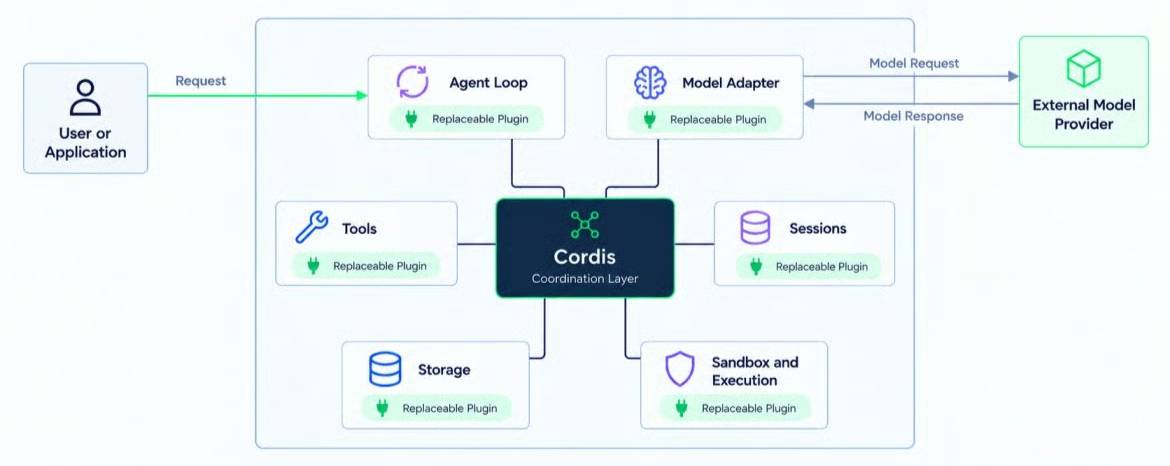
Cordis Services Let Plugins Find Each Other
Cordis provides a shared service registry. Plugins use fixed keys like ctx.tools, ctx.llm, and ctx.sessions instead of importing code from a specific provider. A tool calling ctx.llm doesn't need to know which model adapter is running behind it.
Agent Presets and Runtime Profiles Control Different Layers
If everything is replaceable, you still need a mechanism deciding what gets loaded for any given run. DeepSeek Harness solves this at two layers that are easy to confuse.
Quick summary: A profile controls how the program starts up. A preset controls what the agent can do. If you're just using the web app, skip the next two sections.
Runtime Profile
Runtime profiles (templates include web, headless, sdk, sdk-minimal, and acp) determine how the application launches and which groups of Cordis plugins load at startup. Most users interact with this only through commands like dsh web.
Agent Preset
Agent presets (Standard, PTC, Minimal, or Creator) determine what an active session can access. A patch file can change presets without touching Harness source code.
Agent Loop Orchestrates Turns, Steps, and Tool Calls
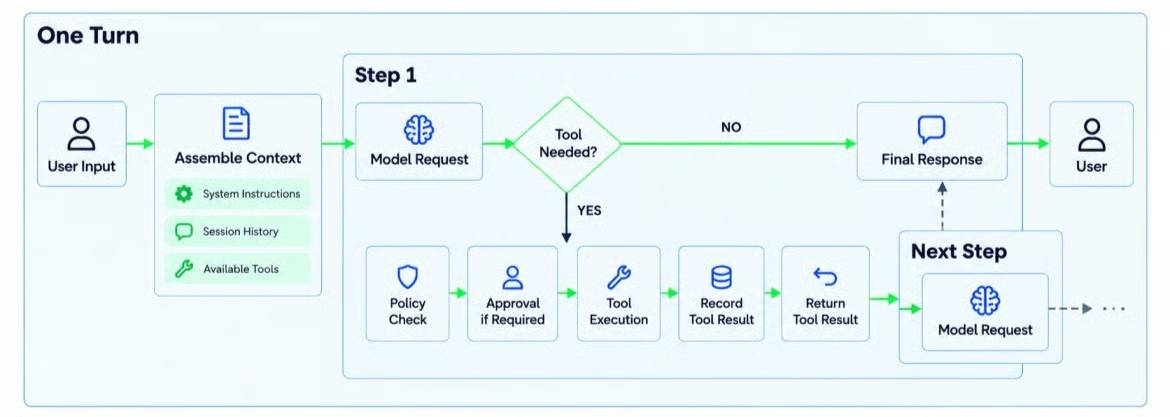
DeepSeek distinguishes between "steps" and "turns." A step is one model request plus its accompanying tool calls. A turn contains zero or more steps—it starts before accepting input and ends when no tasks remain. Most turns execute multiple steps before the agent can respond. A rejected input ends the turn even without any steps.
Sessions Use Append-Only Event Logs
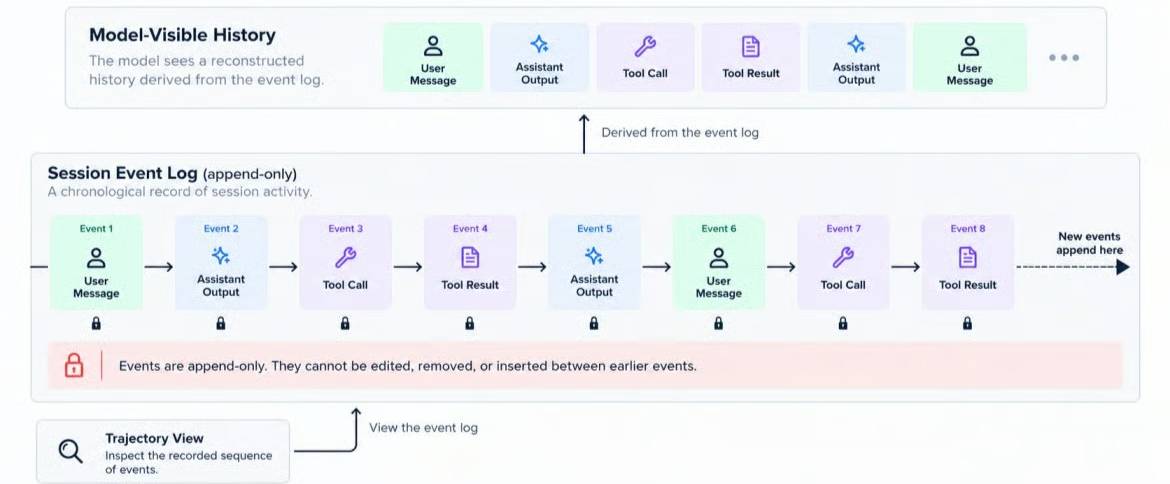
This is the critical piece. Sessions are append-only event logs, not arrays of chat messages. Harness reconstructs model history from that log, and session documentation requires anything sent to the model to be recoverable from it.
Continuation, branching, search, replay, and Trajectory view all build on that event stream. Reconstructing history isn't deterministic replay—model outputs and external state can differ. But the log still provides an auditable record of what happened.
How DeepSeek Harness Controls Tools and Sandboxing
Models can request tools by name, but they can't execute them directly. Two separate control mechanisms sit between the model's request and actual file system changes.
Tool Execution Process
Tool calls go through distinct steps: policy check, execution, and result handling. The model chooses the tool. The runtime decides whether it runs and how it runs. This separation is deliberate.
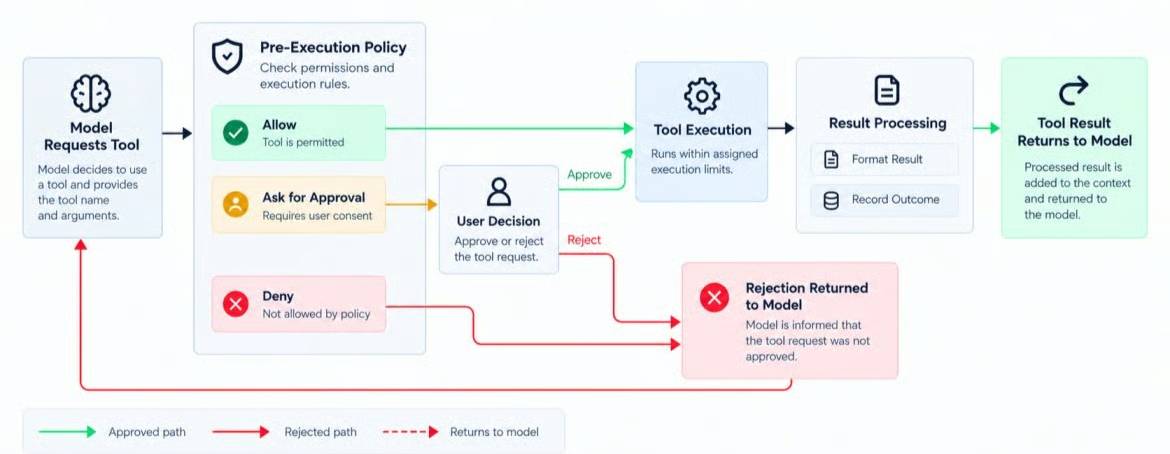
Sandboxing vs. Approval Mechanisms
- Approval is a human checkpoint confirming an action.
- Sandboxing limits the scope and method of executing that action.
DeepSeek separates these two mechanisms, even though preset permission configurations often combine both controls—similar to how container runtimes separate process permissions from execution boundaries.
Asking the model to "only read files" in the system prompt is just guidance the model might follow. It's not a hard security boundary like OS-level sandbox restrictions.
Conclusion
The most memorable insight from the start is this: the model provides reasoning, but the runtime determines what reasoning can reach and accomplish. DeepSeek Harness lets you reshape the runtime—from model adapters and tools to session storage and agent loops.
That control comes with responsibility. Replacing more of the runtime means owning more of its configuration, versioning, and security boundaries. A developer preview with shell access isn't something you install and forget.
Here's the practical takeaway: Use DeepSeek Harness when the runtime environment itself is part of your work. If you just need to fix a code repository, a pre-built agent requires less overhead.
Description: DeepSeek Harness is an open-source agent runtime that bridges AI models with real-world systems. Learn how it differs from AI models and why developer
Related Articles
- Bases: Obsidian's New Plugin Finally Closes the Gap Notion Left Behind
- 7 Surprising Tasks AI Assistants Can Actually Handle for You Right Now
- Use AI to Edit Photos Directly in Google Slides
- Teaching AI to Remember Your Writing Style: A Self-Learning System
- Getting Started with AI Agents: Building Systems That Actually Work

No Comment to " What Is DeepSeek Harness? An Open-Source Agent Runtime Explained "