8 Essential Privacy Tips for ChatGPT Users

AI chatbots are fundamentally data-hungry machines. They learn from your conversations, use your inputs to refine future responses, and—here's where it gets concerning—some companies train their AI models on this data. A few have even been caught selling user information to advertisers. OpenAI claims most ChatGPT data gets anonymized, but plenty of users still want tighter control over what information the system can access. The good news? You have more privacy options than you might think.
ChatGPT lets you customize how much personal information gets shared, limit what data the system collects, and implement several other safeguards. By tweaking a handful of straightforward settings, you can significantly reduce the risk of exposing sensitive details and gain better control over what ChatGPT knows about you.
1. Access ChatGPT Without an Account
You don't need to create an account to use ChatGPT's core features. You can still submit prompts, run web searches, and attach images—all without logging in. The tradeoff? You'll miss out on advanced features and won't have access to everything the paid tier offers. That said, if you only need basic functionality and want zero data tied to your identity, this is your path forward.
2. Skip Third-Party Sign-In Options
When registering for ChatGPT, you can use Google, Apple, or Microsoft accounts for quick signup, or create an account with your own email. If you want to minimize data sharing with third parties, stick with a standalone email address instead of linking to those big tech platforms.
Apple sign-in does offer better privacy—especially if you enable Hide My Email through iCloud+, which masks your real email address when you create your ChatGPT account.
3. Enable Temporary Chat Mode
Don't want ChatGPT storing your conversation history? Flip on the Temporary Chat feature. This mode skips saving messages entirely and won't use them to personalize future interactions. It's perfect when you're discussing private or sensitive topics and prefer zero record-keeping.

4. Disable Model Training
Want to prevent your conversations from being used to improve ChatGPT's underlying models? You can turn this off. Head to Settings, then select Data Controls.

Now toggle off Improve model for everyone. Once disabled, all your new conversations will stay out of ChatGPT's training pipeline.

5. Turn Off Memory Features
ChatGPT can remember details you share to customize future conversations. If you'd rather it forget everything, disable the Memory function entirely.
- Navigate to Settings, then tap Personalization

In the new window, find the Memory section and switch off Use saved information. What's interesting here is that disabling saved memory also automatically turns off chat history references.

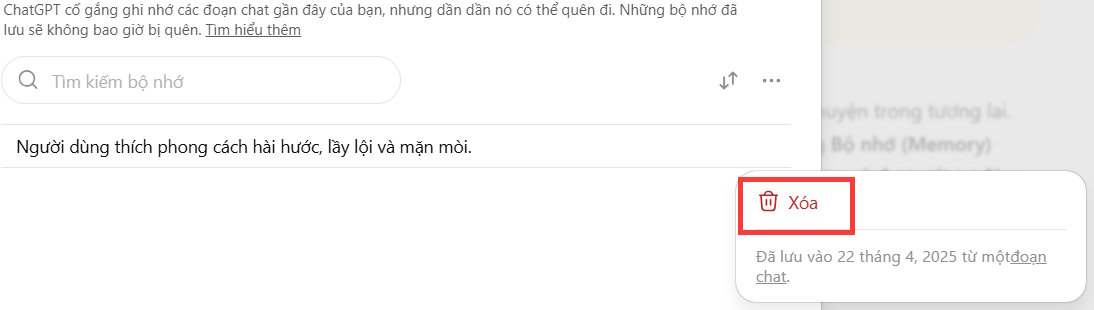
Want to see what's already been saved? Click Manage to view stored information. Then tap the three-dot menu next to any entry and select Delete.
6. Clear Browser Data
If you use ChatGPT's paid automation features, the system might cache cookies and web data for future sessions. To strengthen privacy, disable the option to store web data between sessions.
Go to Settings > Data Controls > disable Remote Browser Data. While you're at it, clear out any stored cookies if needed.
7. Delete Chat History
ChatGPT archives every conversation so you can revisit past chats and pick up where you left off. But you might not always want that happening. You can delete conversations individually or wipe your entire history in one go.

8. Enable Security Keys
Security keys add a second verification layer beyond your password. When logging in, you'll need to confirm your identity using a code sent to an authenticator app or registered device. The real concern is unauthorized account access—and this step makes it nearly impossible.

Enabling security keys is one of the simplest yet most effective ways to lock down your ChatGPT account and personal data.

Hit Enable to activate Security Keys on your account.


No Comment to " 8 Essential Privacy Tips for ChatGPT Users "