Use Gemini to Instantly Summarize Google Forms Responses
As Google Forms collect more responses, manually reading through hundreds or thousands of answers becomes a serious time drain. Here's where Gemini steps in to transform how you analyze feedback. Instead of slogging through every single response, Gemini handles the heavy lifting by distilling responses into concise summaries, spotting recurring themes, clustering similar opinions, and flagging noteworthy comments. The result? Evaluating survey results and making data-driven decisions becomes genuinely manageable. Let's walk through how to leverage Gemini for summarizing Google Forms responses quickly.
What's interesting here is that Gemini essentially becomes your personal research assistant, automatically identifying patterns you might otherwise miss in large datasets.
How to Summarize Google Forms Responses with Gemini
Important note: This feature currently works only with Google Forms displayed in English.
Step 1:
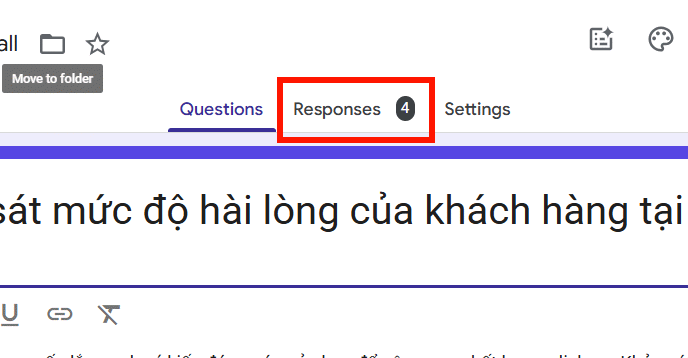
Open your survey form that already contains responses. Navigate to the Responses section to view all the feedback collected.
Step 2:
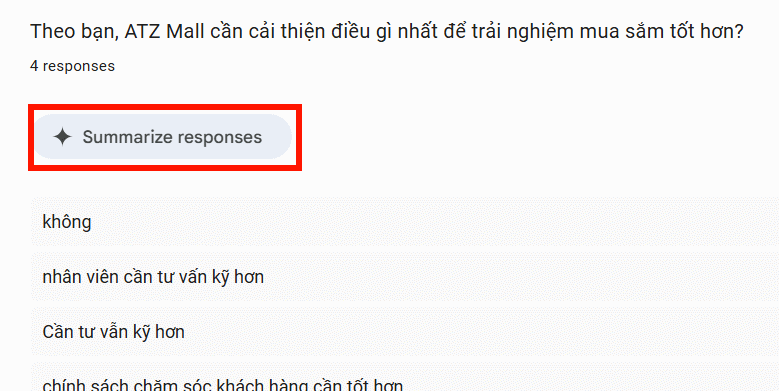
You'll see the aggregated response data displayed on this page. Scroll down and you'll find the summary section where Gemini has already processed your answers. Click Summarize responses to view the AI-generated summary.
Step 3:
Gemini now displays a high-level overview of participant feedback based on its analysis.
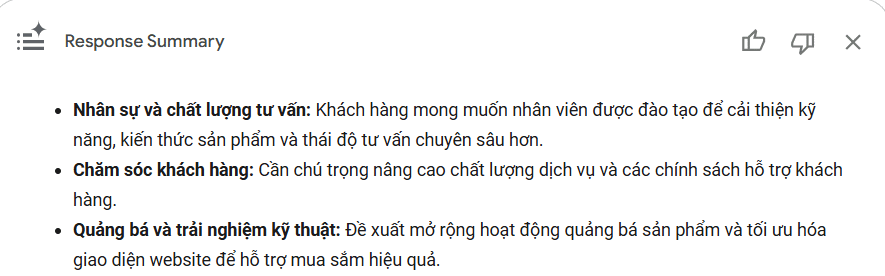
If you want a different angle on the data, hit Retry to regenerate the summary. Gemini bases this on the most common themes and presents them in clearer language.
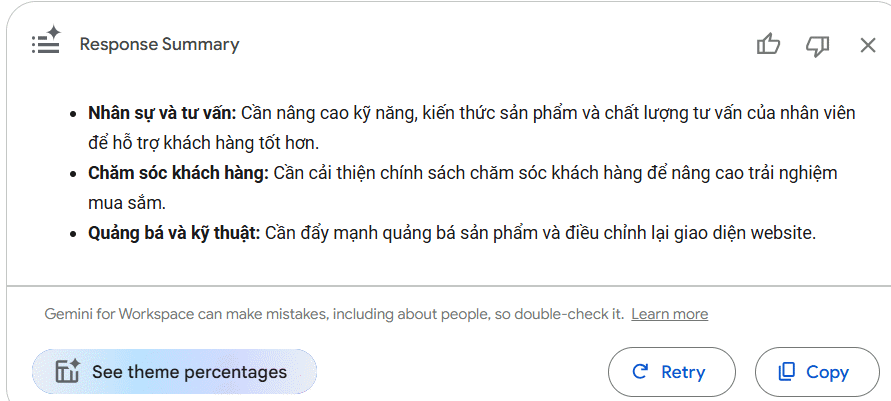
Reviewing and Validating Gemini's Summary
Once Gemini generates the summary, take time to review it carefully. Make sure all critical information has been captured accurately. While Gemini excels at rapid synthesis, the real concern is that summaries serve as a support tool—they may not encompass every single response or nuance.
When evaluating the summary, watch for:
- Whether the main points accurately reflect what participants actually said.
- Spot-checking against original responses to verify accuracy.
- Standout opinions or exceptional feedback that Gemini might have overlooked.
- Using the summary as supporting evidence, not the sole basis for major decisions.
This validation step ensures your analysis is solid and prevents you from missing valuable insights.
When Should You Use Response Summaries?
Gemini's summary feature shines in these specific scenarios:
- Forms with high response volume—saves enormous amounts of reading and synthesis time.
- Lots of open-ended questions that need quick pattern recognition and trend identification.
- Preparing survey reports, where you need to highlight key findings before diving into detailed analysis.
- Rapidly isolating critical issues so you can prioritize which responses deserve closer attention.
For forms with just a handful of responses or mostly multiple-choice questions? You can skip Gemini and review results directly in Google Forms. Matching the right tool to your specific situation means getting better results with less wasted effort.
Description: Learn how to use Gemini AI in Google Forms to automatically summarize feedback and identify key themes from hundreds of responses.
Related Articles
- AI-Powered Excel & Google Sheets Assistant: Generate Formulas, Functions, and Fix Errors Instantly
- Protect Your ChatGPT Account with Lockdown Mode: A New Security Feature
- The Upload Button Paradox: How AI Tools Became Your Company's Biggest Security Risk
- Best AI Tools for Microsoft Excel in 2026: Data Analysis, Formulas & Charts
- What Makes Google Flow Agent Special? Complete Guide to AI Video Creation

No Comment to " Use Gemini to Instantly Summarize Google Forms Responses "