The 5 Best AI Tools for Data Analysis in 2026
The days of data analysts manually writing hundreds of lines of Python to clean datasets, build visualizations, and generate reports are officially over. A new generation of AI tools is reshaping the entire workflow, automating tasks that once consumed hours of tedious, repetitive work.
Modern AI platforms do far more than just read and analyze spreadsheets. They automatically clean messy data, write and execute Python or SQL code, generate charts, spot trends, explain patterns, and build reusable analytical pipelines—all with minimal human intervention. What's interesting here is that analysts can now skip the grunt work entirely and focus on asking the right questions and extracting actionable insights.
Here are five standout AI tools reshaping data analysis for 2026. Whether you're working with Python, SQL, notebooks, databases, or local projects, these platforms can dramatically cut the time it takes to transform raw data into meaningful intelligence.
Deepnote – An AI-Powered Collaborative Workspace for Data Teams
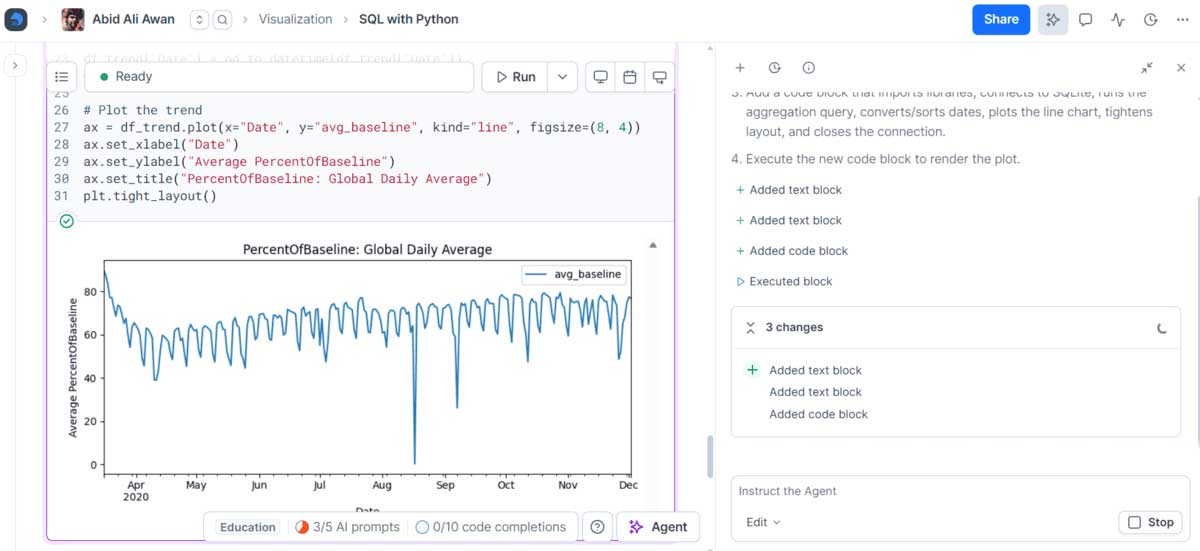
Deepnote is a collaborative notebook platform with AI baked in from the ground up. At its core sits Deepnote Agent—an intelligent assistant that understands your entire project context, plans multi-step workflows, and automatically adds, edits, or removes Python, SQL, and text blocks to complete complex analytical tasks.
Beyond that, Deepnote packs in a suite of AI capabilities: automatic analysis generation, SQL query suggestions, code recommendations and fixes, data visualization, error detection and correction, and code explanation. Describe what you need in plain language, and the AI handles most of the heavy lifting right inside your notebook, with full ability to review or tweak results on the fly.
For enterprise users, Deepnote supports OpenAI-compatible models and offers Deepnote MCP, allowing popular AI tools like Codex, Claude, Cursor, and Visual Studio Code to connect directly with your notebook and active projects.
If you're working in teams or need a data environment where AI is deeply woven into your daily workflow, Deepnote is one of your strongest bets right now.
ChatGPT – Straightforward Yet Powerful Data Analysis
ChatGPT is probably the most accessible entry point for anyone new to AI-assisted data work.
Upload a CSV or Excel file and you can ask ChatGPT to clean your data, find trends, spot anomalies, run Python calculations, build tables, draw charts, and summarize findings in plain English—with virtually no coding required. The real convenience here is that non-technical users can accomplish serious analytical work in minutes.
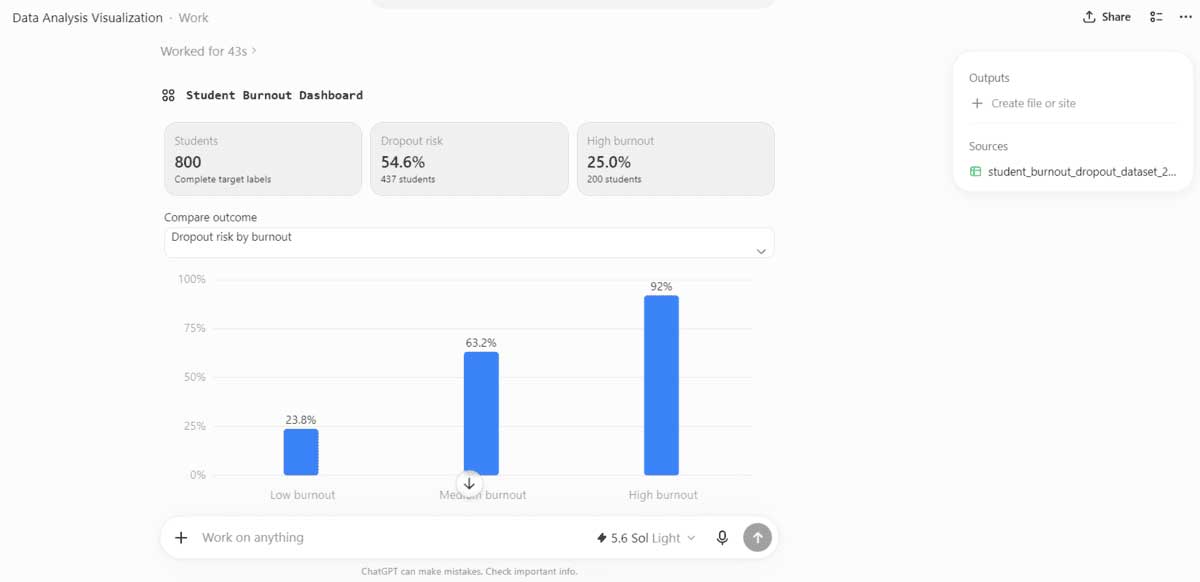
In testing with a student burnout dataset, ChatGPT automatically constructed a complete dashboard with key metrics, visual charts, and a clear summary without requiring any manual code writing from the user.
That capability expands further with ChatGPT Work. Feed it data and your end goal, and it can analyze everything and produce reports, spreadsheets, presentations, or even a finished website.
OpenAI has also rolled out GPT-5.6 on ChatGPT, while ChatGPT Work subscribers can access newer models like Sol, Terra, and Luna depending on their plan. According to OpenAI, these new models significantly boost analytical depth and spreadsheet handling.
For quick data exploration, rapid visualization, and summary reports, ChatGPT delivers instant results and remains the go-to choice for speed and simplicity.
Claude Code – AI That Writes Code and Completes Full Analytical Workflows
Though not a dedicated data science platform, Claude Code proves surprisingly effective for Python-based analytical projects.
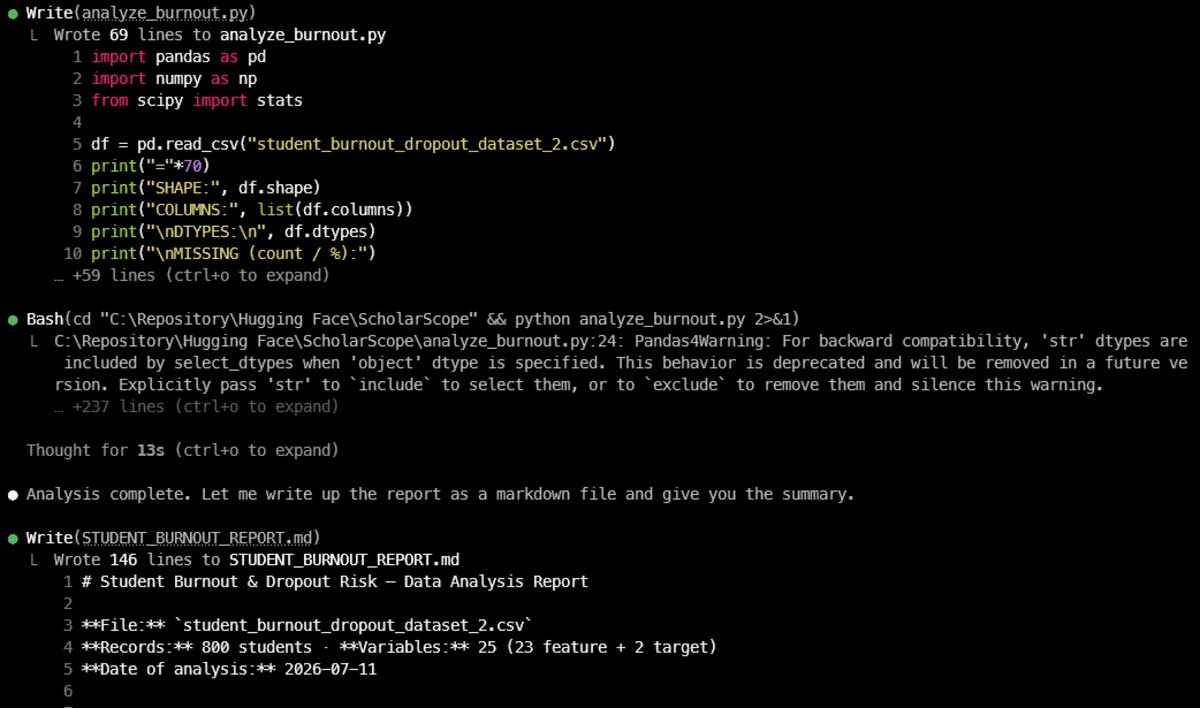
Drop your dataset into a project folder, open Claude Code's command interface, and ask the AI to inspect your data, write Python scripts, run the analysis, fix bugs, generate charts, and export a finished report. It handles the entire pipeline with minimal input.
In testing, Claude Code built a complete analysis script, executed it against a student burnout dataset, validated the results, and generated a 146-line Markdown report automatically.
The real strength of Claude Code is its ability to read files, edit code, and execute commands directly on your system, making the whole process feel almost hands-off.
Claude Code now exists as more than just a CLI tool—it's available as a desktop app, a Visual Studio Code extension (which previews changes inline), and a web version. The VS Code extension shows code edits in real-time, while the desktop app can manage multiple local and remote sessions simultaneously.
This is the right pick for large-scale data science projects, automated reporting pipelines, and building reusable analytical frameworks.
DataLab – An AI Notebook Built for Beginners
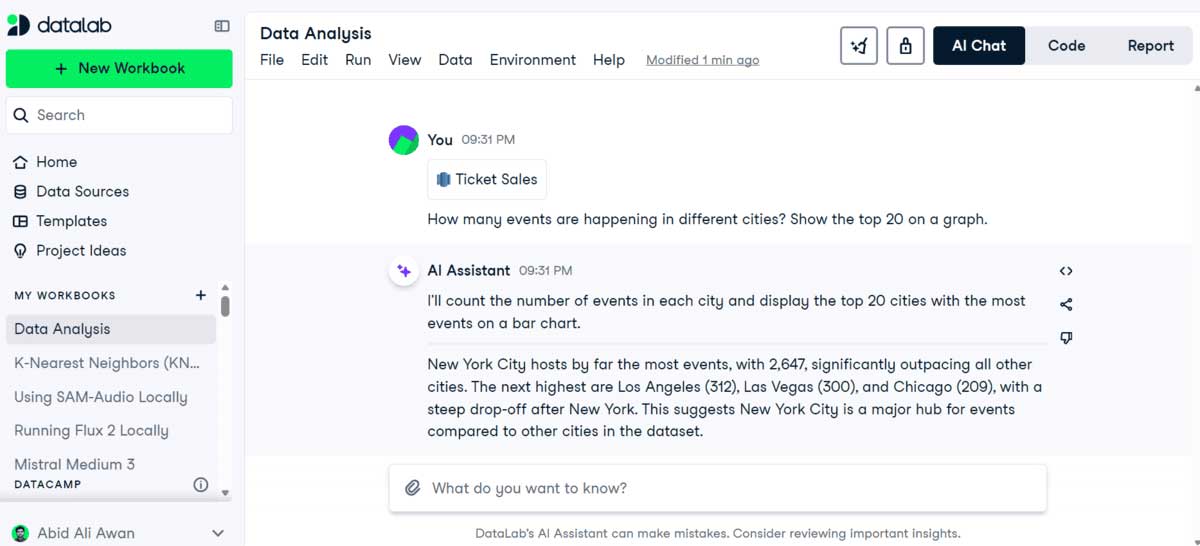
DataLab from DataCamp is a data analysis notebook with an integrated AI Assistant that works much like ChatGPT.
Connect your data source, describe what you need in natural language, and the AI generates Python, R, or SQL code, runs the analysis, visualizes results, and explains the findings.
In testing with Google BigQuery as the data source, a single simple question about ticket sales was enough for the AI to read the data, perform analysis, create a chart, and explain the outcome.
DataLab goes beyond chat—it also supports prompt-to-code generation, code editing, auto-completion, debugging, and code explanation. All results stay visible in the notebook so you can review, modify, and re-run as needed.
In many ways, DataLab mirrors Deepnote by combining collaborative notebooks, connected data sources, AI chat, code generation, and reporting in one workspace. The difference is that DataLab feels more approachable for learners navigating the DataCamp ecosystem.
VS Code with Codex – The Professional-Grade Data Analysis Environment
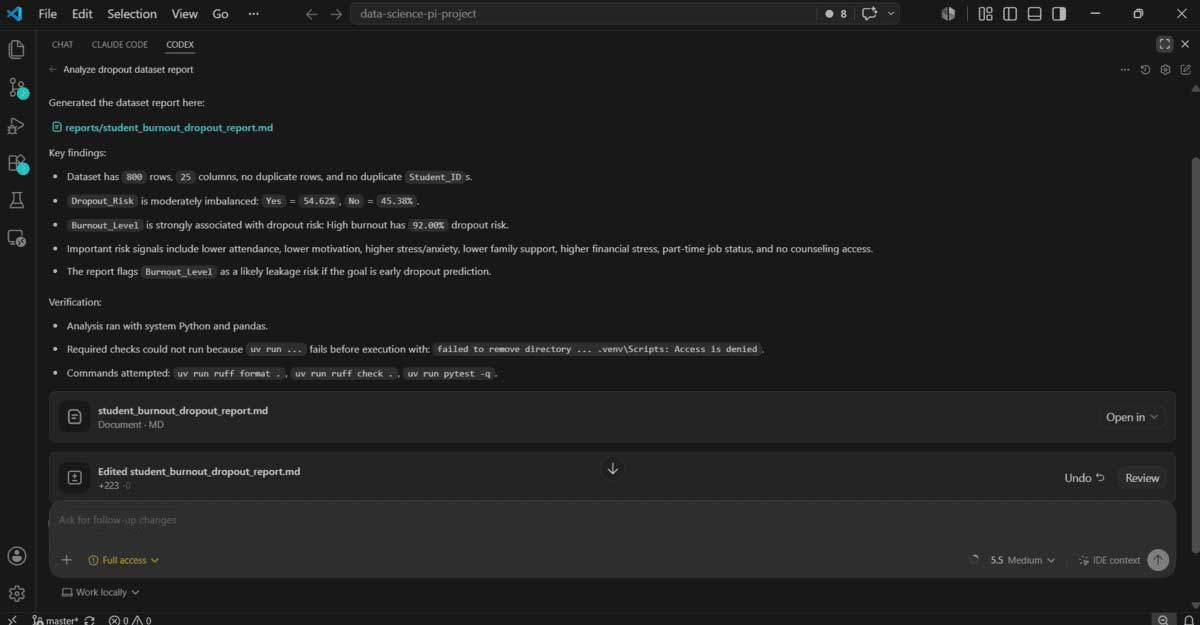
Codex now lives across multiple platforms: the ChatGPT desktop app, CLI, IDE extensions, and web interfaces.
But the most natural experience is using Codex directly inside Visual Studio Code.
Keep a notebook, Python scripts, CSV files, and reports all open in one project. Ask Codex to read the full context, edit your code, run analysis, fix errors, or extend your pipeline—all with brief commands. The Codex extension can use open files or selected code snippets as context, letting it propose more precise edits while showing changes alongside your original code.
This makes the entire workflow far more interactive. Instead of reading answers in a chat window, you get notebooks, scripts, charts, and reports living inside your project, ready for further refinement and development.
For data analysts or engineers already comfortable with VS Code, this is one of the most flexible and powerful AI solutions available today.
AI Is Fundamentally Reshaping How Data Gets Analyzed
AI has already transformed how data professionals work. Instead of manually building every step—cleaning data, writing charting code, drafting reports from scratch—analysts now provide data and goals, then let AI handle the repetitive work.
Need fast exploration or initial data discovery? ChatGPT is your shortcut. Want an AI-integrated notebook experience? Deepnote and DataLab deliver that seamlessly. Running large Python projects or automated reporting pipelines? Claude Code excels there. Already living in VS Code? Pairing it with Codex creates a seamless workflow where notebooks, scripts, data, and reports all live in one unified project.
But here's the critical reminder: as AI gets smarter, the most important principle never changes. Let AI speed up your work, but always verify the code, the math, and the conclusions yourself before making decisions based on your data.
Description: Discover the top AI-powered platforms transforming data analysis—from ChatGPT to Claude Code. Automate cleaning, coding, and reporting in 2026.
Related Articles
- 11 Ways to Open the On-Screen Keyboard in Windows 10
- How AI Is Reshaping Entry-Level Job Opportunities for Recent Graduates
- Understanding AI Copilot in Dynamics 365: What It Does and Why It Matters
- Master AI-Powered Writing with Rytr: A Complete Getting Started Guide
- How to Access BIOS on Different Computer Models: A Complete Guide

No Comment to " The 5 Best AI Tools for Data Analysis in 2026 "