8 Efficient AI Models That Run Smoothly on 8GB VRAM or Less
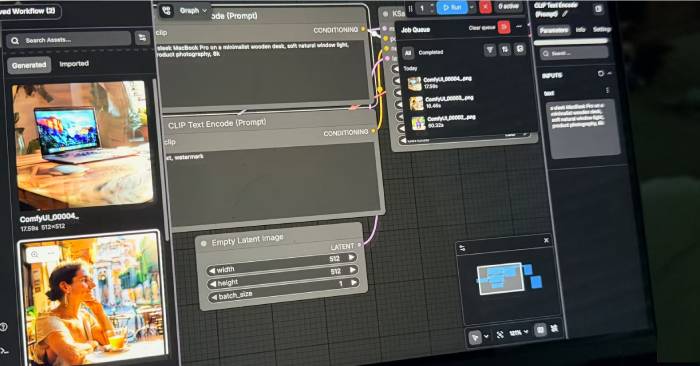
Running AI models locally typically demands massive amounts of VRAM, and let's face it—not everyone has access to a shiny new high-end GPU with 20GB+ of memory. The good news? There are genuinely capable alternatives that won't break the bank or require bleeding-edge hardware. Depending on what you actually need to do, these lightweight options can deliver surprisingly solid results, whether you're rocking an AMD or Nvidia card.
Phi-3.5 Mini (3.8B Parameters)
Speed and Efficiency Combined
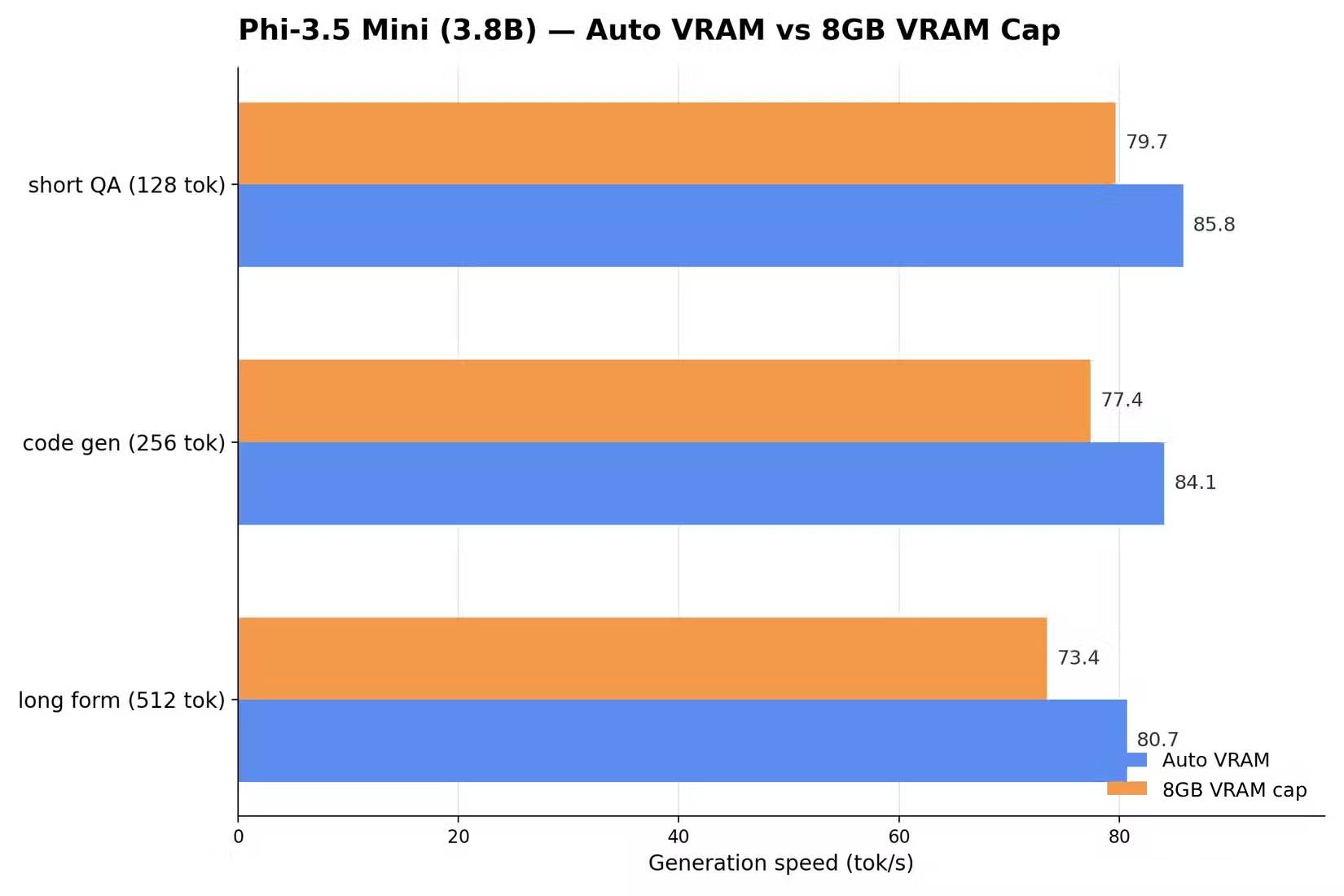
Phi-3.5 Mini excels at blazing-fast inference while keeping memory demands surprisingly low. You can run high-precision FP16 models without burning through your VRAM budget, and it tops the list for raw tokens-per-second throughput. Here's the catch: it struggles with multi-step reasoning tasks and lacks the versatility you might want for broader applications. That limitation brings us to our next contender.
Llama 3.1 (8B Parameters)
The Well-Rounded Performer
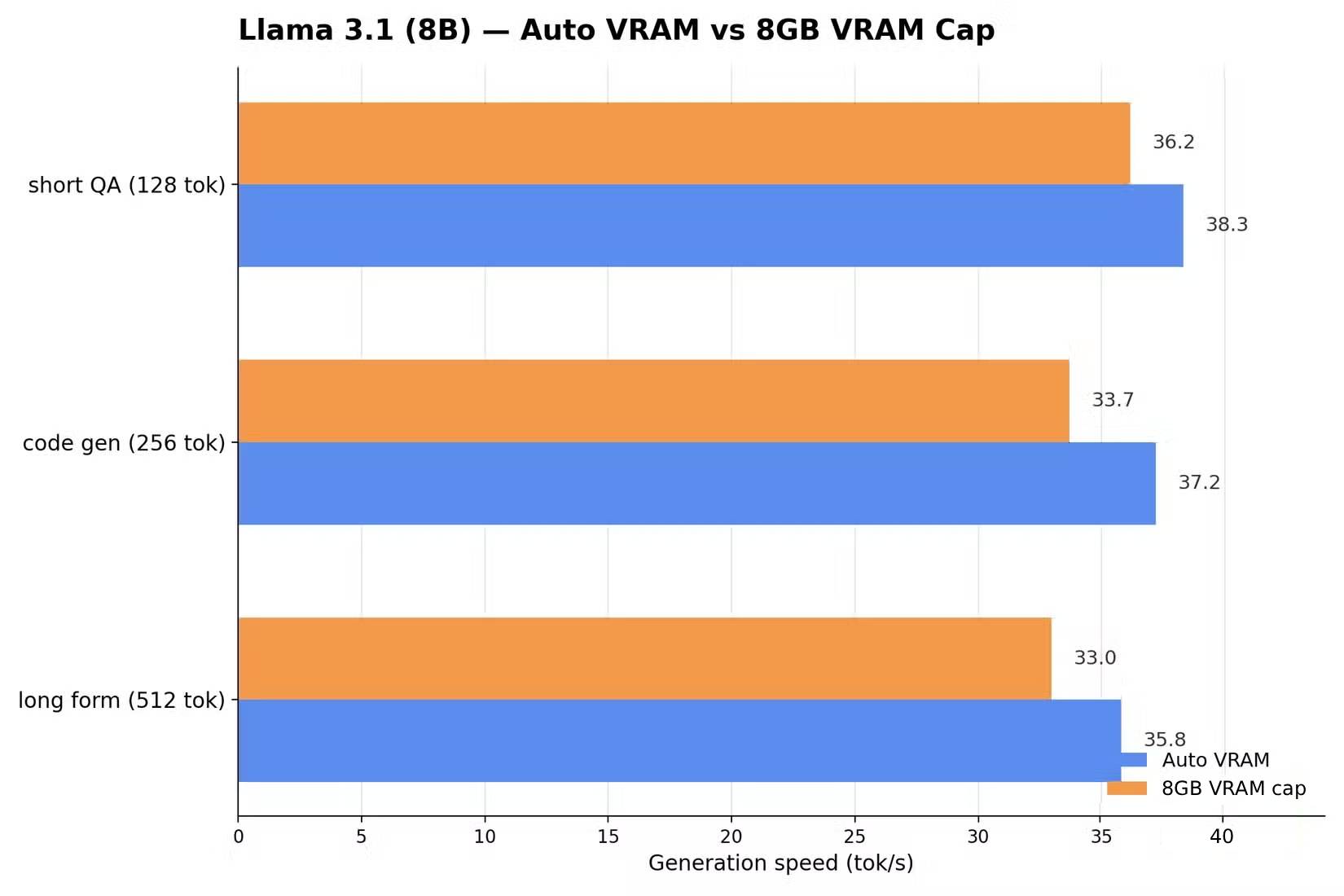
Llama 3.1 strikes the best balance in this lineup. It handles both reasoning tasks and everyday use cases with respectable competence. What's really interesting here is its optimization for AMD's ROCm toolkit. When paired with 4-bit quantization, VRAM usage drops below 6GB—making it perfect for older graphics cards that would otherwise struggle.
The trade-off is real though: compressing models to 4-bit quantization inevitably sacrifices some accuracy. But honestly, the memory savings usually outweigh this drawback. Without compression, you'd max out your 8GB VRAM immediately, leaving zero headroom for anything else.
Mistral 7B (v0.3)
Fast Without Sacrificing Stability
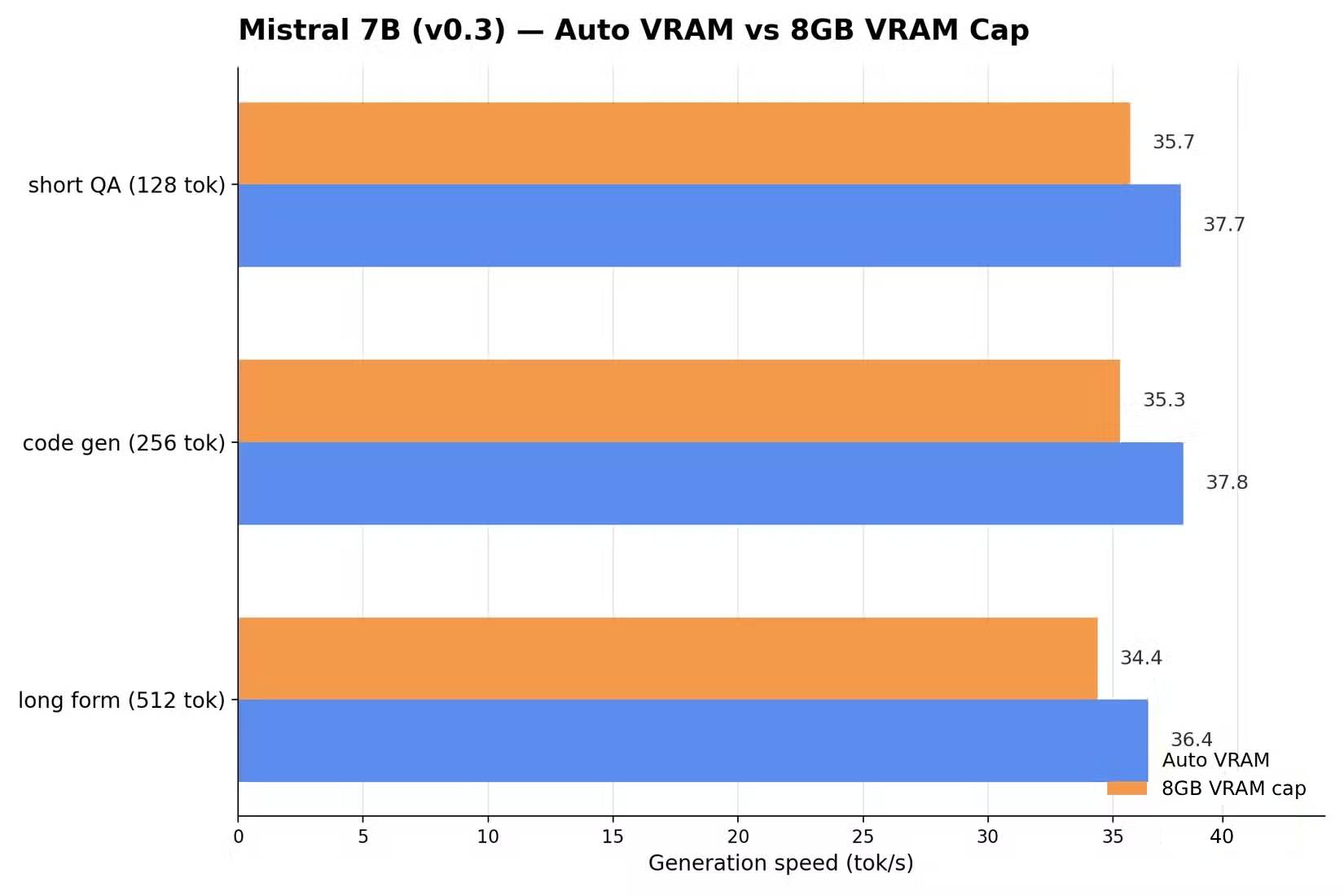
Mistral 7B delivers significantly better efficiency than Llama, delivering a nice equilibrium between raw speed and output quality. It also handles prompts more gracefully when running under 4-bit quantization.
The real limitation is its hard-capped 32k token context window—limiting it for longer documents or more complex technical tasks compared to Llama. For creative writing and simpler workloads, though, it remains a solid choice.
Qwen 2.5 (7B)
Excellent Performance With Somewhat Formal Responses
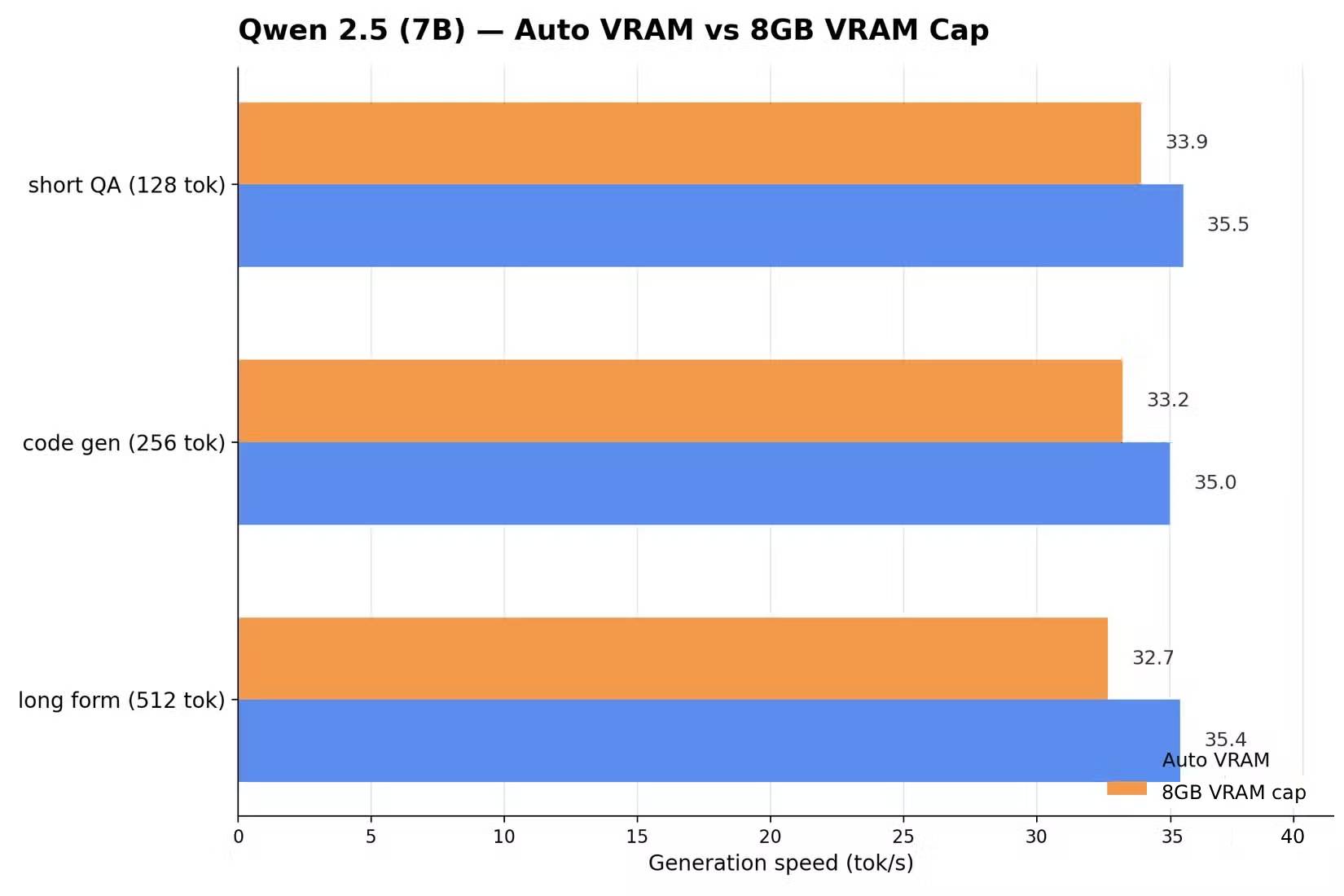
Qwen 2.5 runs extremely efficiently and was trained specifically for multilingual tasks with decent cross-language comprehension. The downside? It tends to generate rather stiff, formal responses that lack natural conversational flow. Interestingly, this formal tone makes it excellent for technical documentation and professional writing.
Gemma 2 (9B)
The Heaviest Hitter in This Category
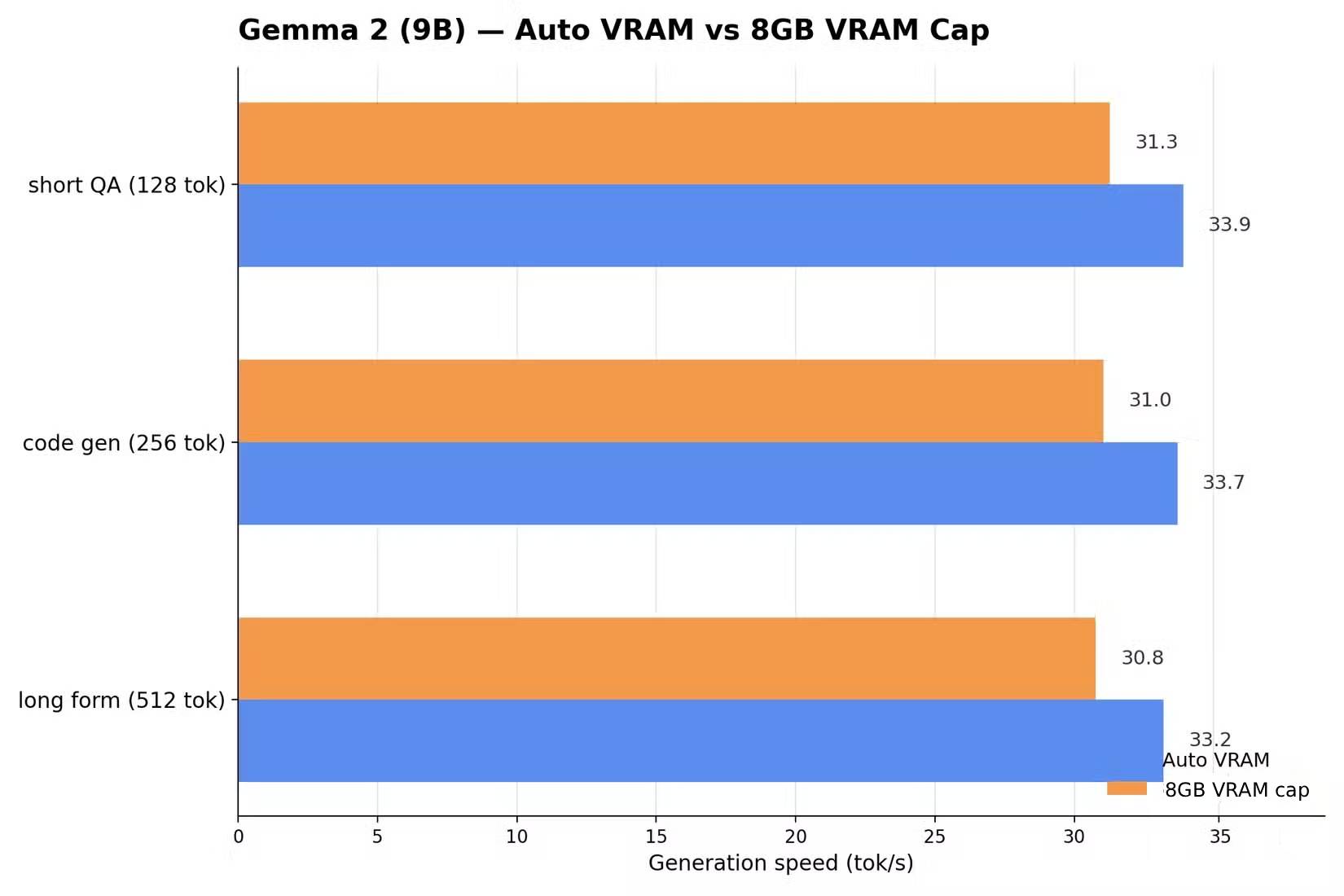
Gemma 2 9B remains one of the largest models you can practically run on an 8GB VRAM GPU. Its reasoning capabilities within this tier are genuinely impressive—but it demands mandatory 4-bit quantization with zero VRAM breathing room. The real concern is speed: it processes slower than smaller 7B models and may not suit tasks requiring snappy responses.
DeepSeek-R1-Distill-Qwen (7B)
DeepSeek Built for 8GB VRAM Systems
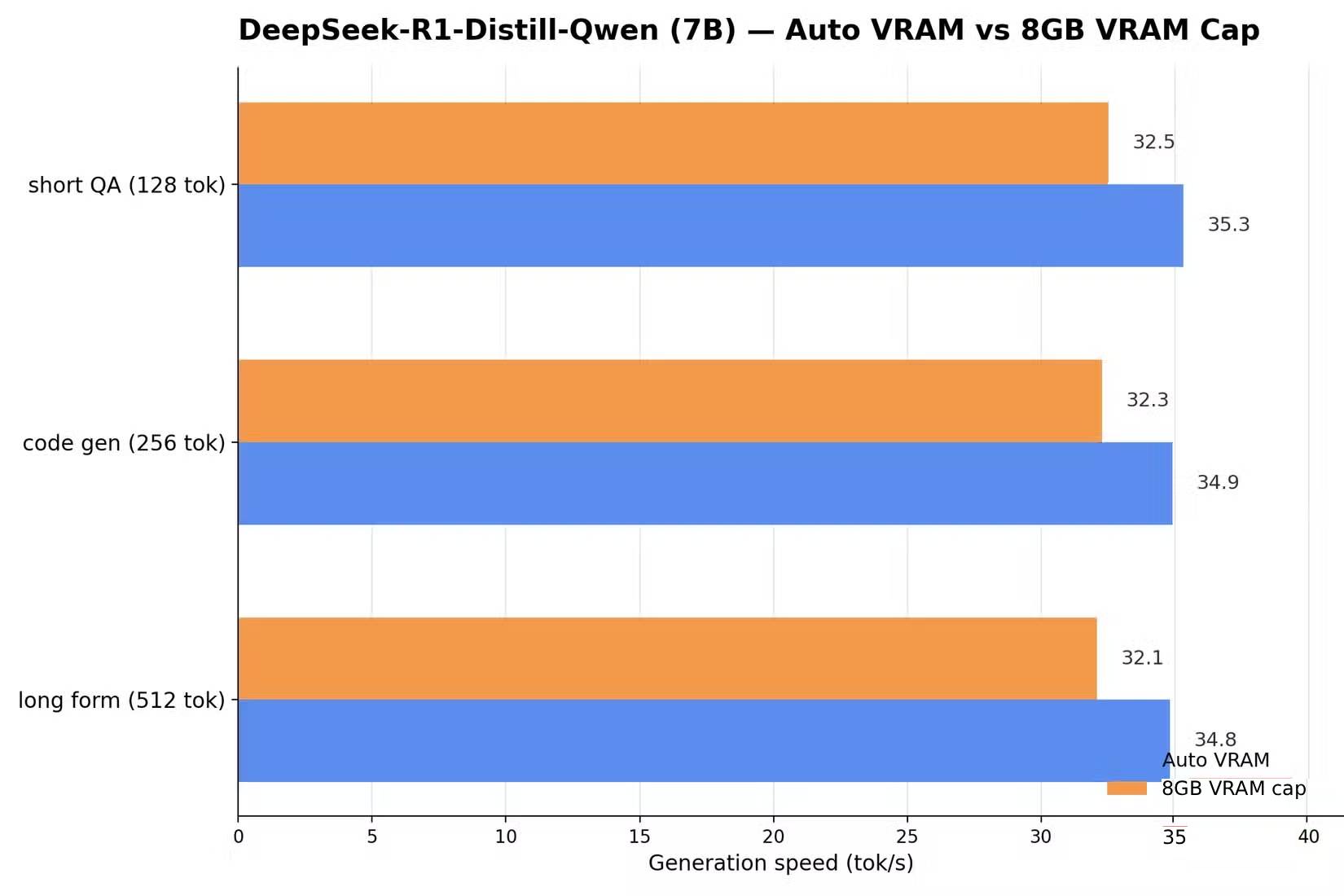
This is a lightweight distilled version of DeepSeek R1 designed for local inference, delivering solid logical reasoning capabilities. It performs exceptionally well under Q4 quantization, though responses can feel slower due to its chain-of-thought reasoning process that internally processes information through multiple inference steps.
DeepSeek-Coder (6.7B)
DeepSeek Purpose-Built for Programming
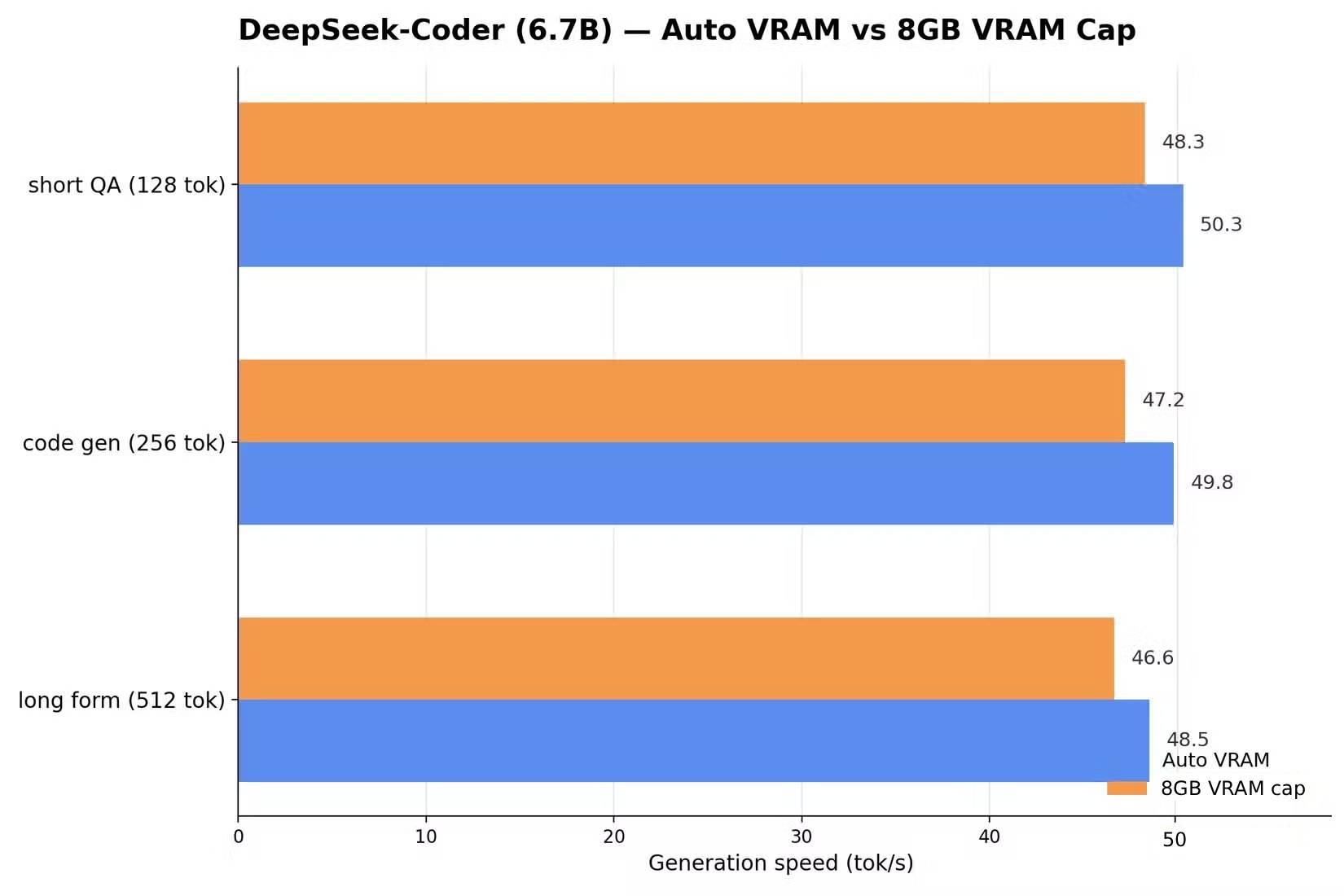
As the name suggests, DeepSeek Coder was specifically trained for code generation and debugging. It consumes minimal memory in 4-bit mode and maintains enough headroom to handle complex code prompts within your 8GB constraint.
The catch: it's a specialist model, so creative content generation isn't its strong suit. You'll want to choose something else if you need help with writing or general-purpose tasks.
Gemma 2 (2B)
Knowledge Limitations Are a Real Factor
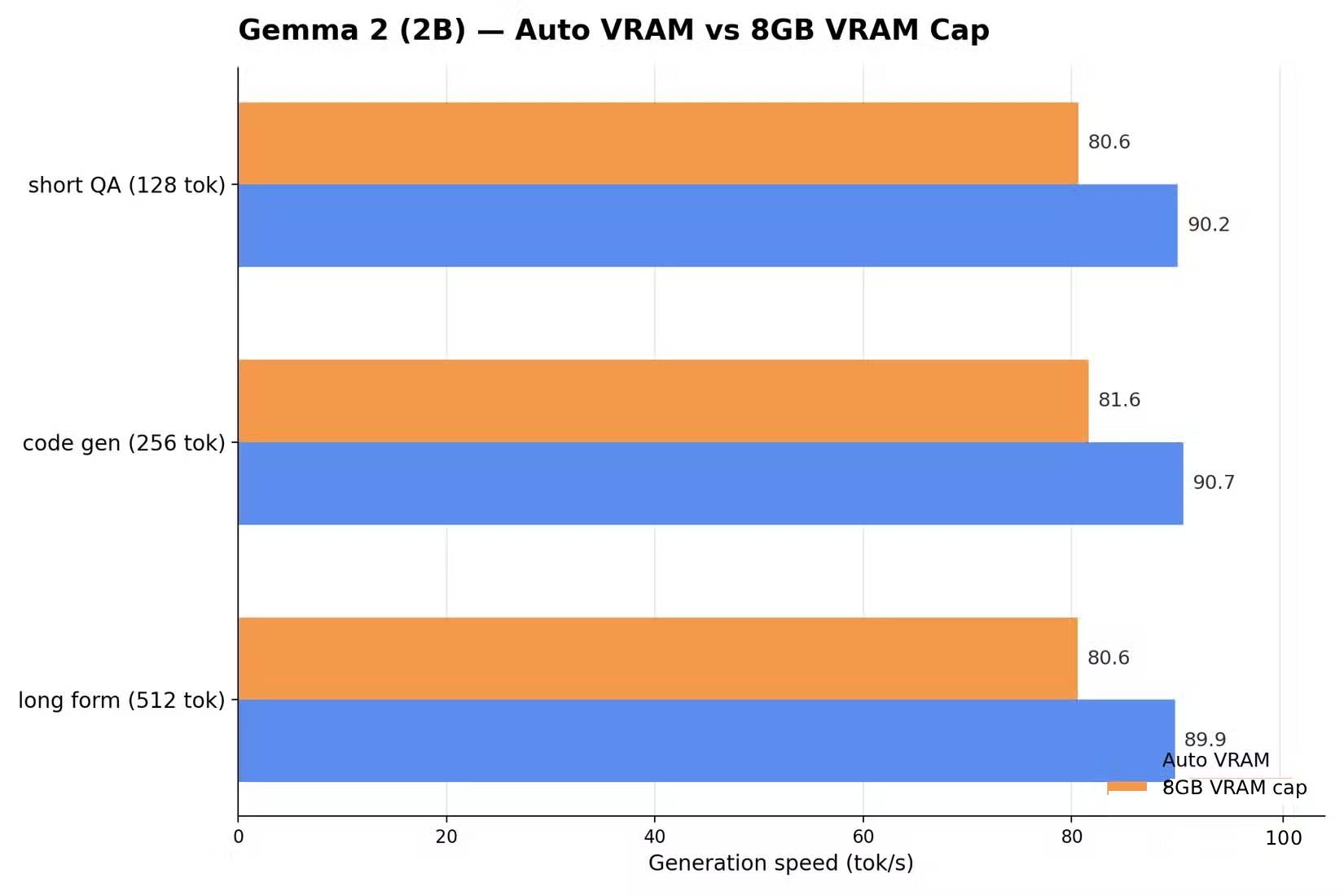
Gemma 2 2B is featherweight—optimized for systems with severely limited VRAM or constrained resources. It's blazingly fast and efficient, but with only 2.6 billion parameters, it has significant gaps in world knowledge and understanding. Best suited for quick on-device tasks like real-time translation and text summarization where you don't need deep knowledge retrieval.
Performance Benchmarking the Models
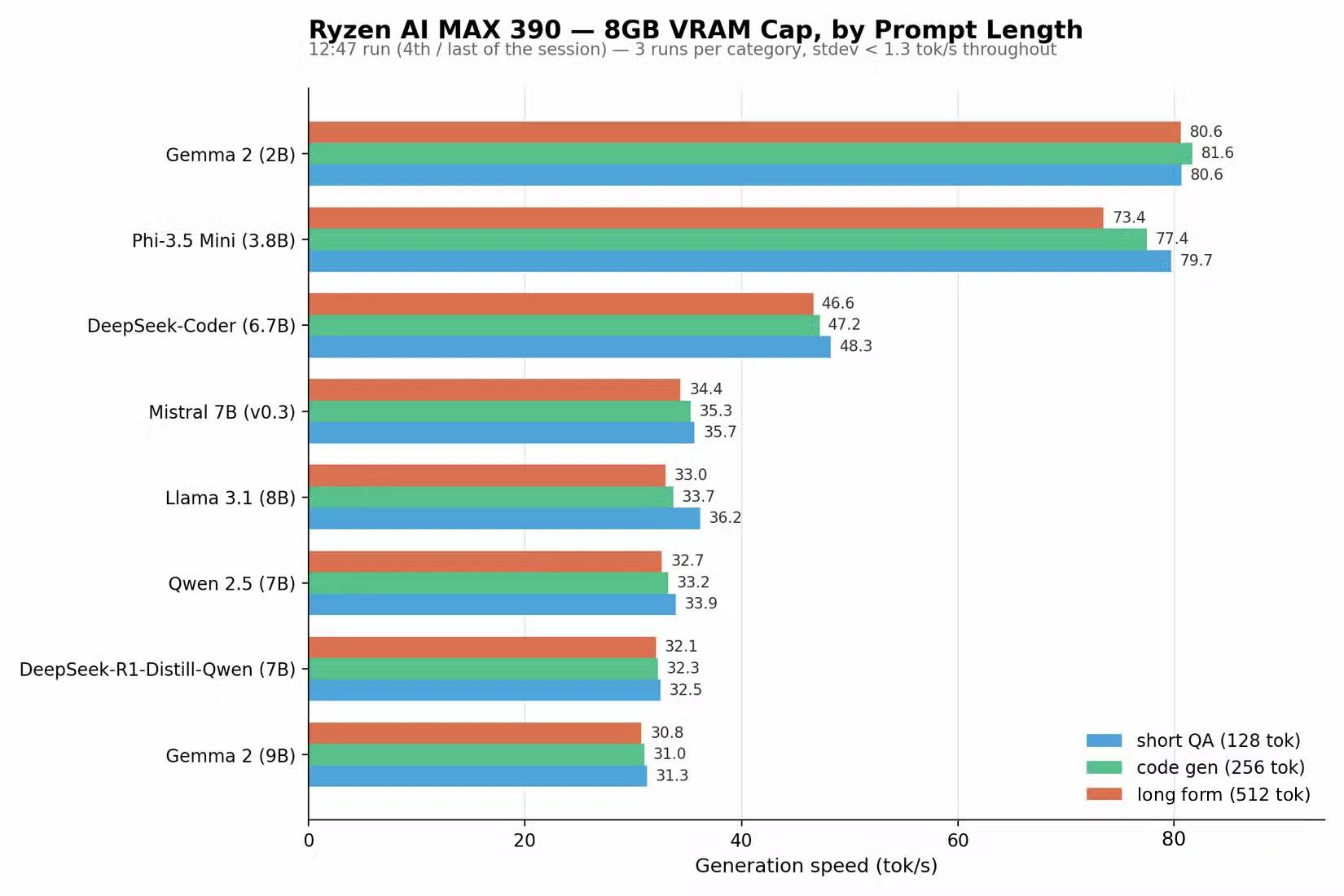
Of course, we can't wrap up without actual performance testing. A custom benchmark script was deployed on Arch Linux running on the same test hardware throughout.
ROCm was configured as the backbone for all tests—straightforward on Arch Linux via the ollama-rocm package. After enabling the systemd service, a test run confirmed GPU detection on the system.
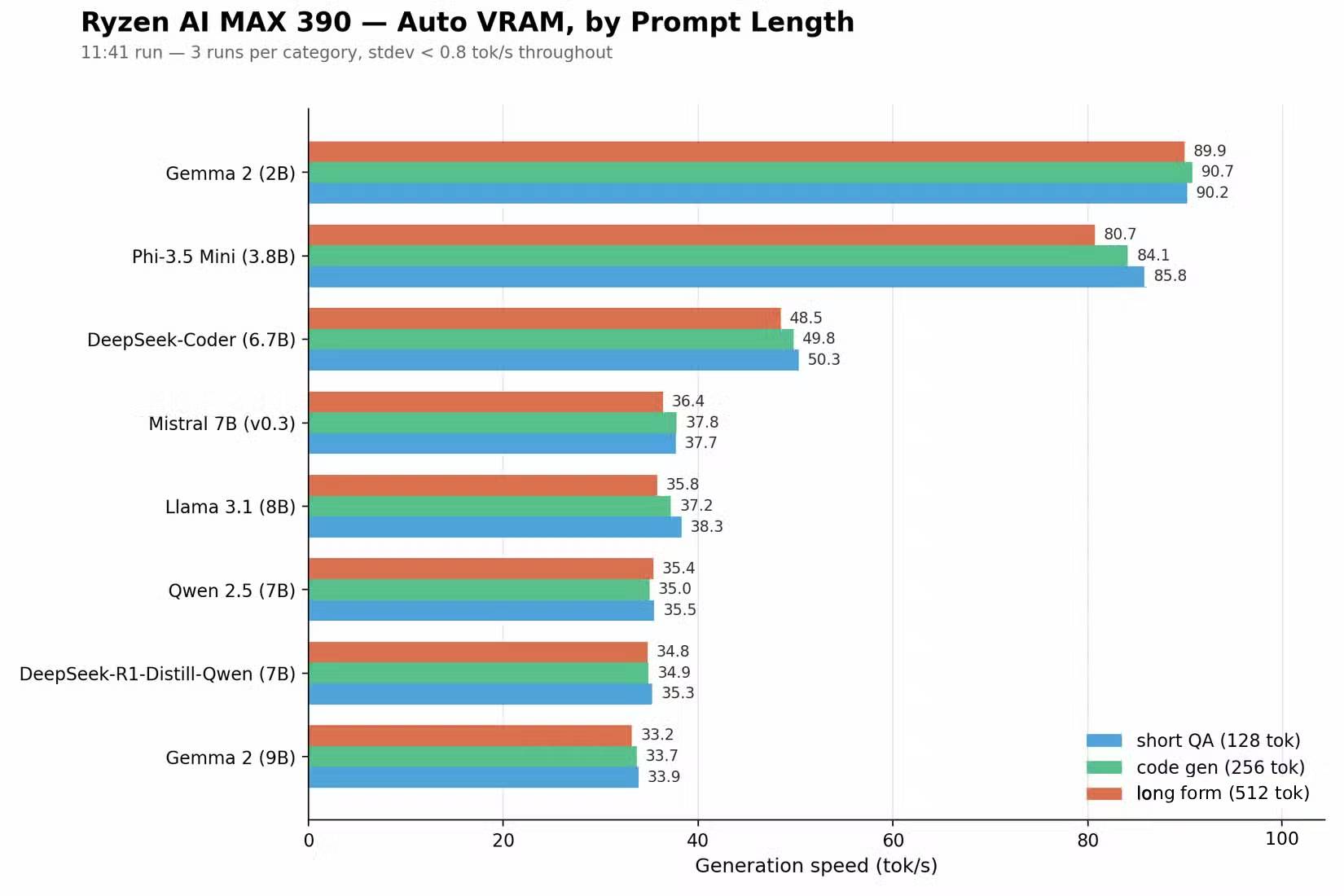
Unfortunately, the Ryzen AI Max 390 integrated GPU wasn't automatically detected, so we had to manually force the system to recognize it as an "unsupported" GPU (though it actually works fine). After setup was complete, Python testing began. We maxed out TDP settings and ran the cooling fan at 100% to prevent thermal throttling during the workload.
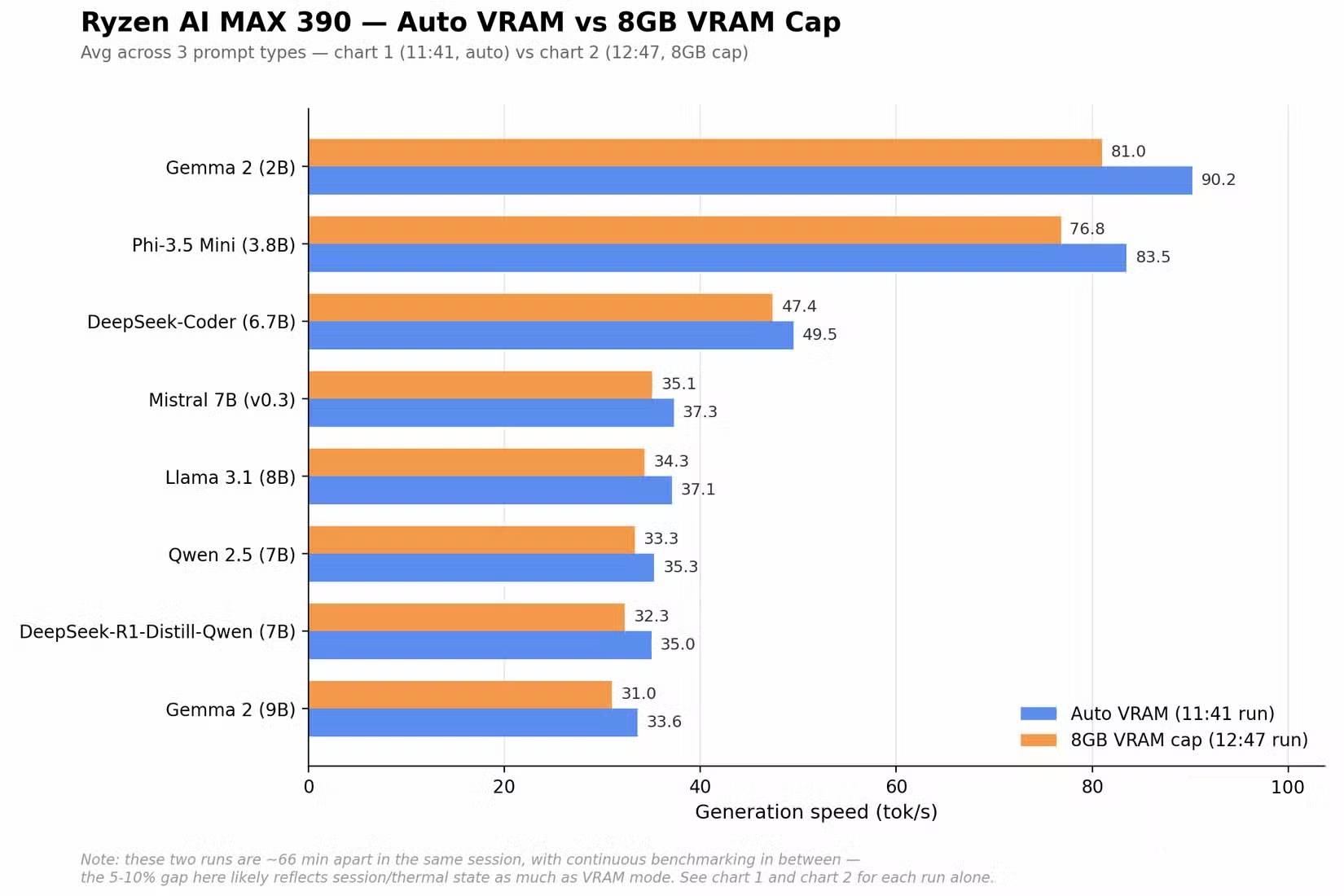
Tests were conducted while plugged in, comparing two VRAM configurations: Auto mode (which dynamically allocates memory to the iGPU as needed) and hard-limited 8GB VRAM. These settings required BIOS changes, necessitating system reboots between test runs.
Auto VRAM unsurprisingly delivered better performance—roughly 5 to 10% improvement. Don't expect identical results on every system after a cold boot, though. Thermal saturation is a real-world factor that tanks performance; processing speeds stabilize at lower rates after sustained operation.
Calibrate Your Expectations Accordingly
With just 8GB VRAM, you're facing genuine constraints long-term. Honestly, 8GB is simply insufficient for serious local AI work anymore, despite how common it still is.
While larger models technically run, memory gets consumed by your display server—eating into VRAM that could be doing actual AI work. This overhead is unavoidable.
KV cache grows with each conversation, so prepare for rapid saturation. The good news? You can definitely operate smaller models within this budget. Think of it as a stepping stone toward more demanding AI tasks down the road once you upgrade.
Description: Discover 8 capable open-source AI models optimized for 8GB VRAM. From Phi-3.5 Mini to Gemma 2, find the perfect local AI setup for your hardware.

No Comment to " 8 Efficient AI Models That Run Smoothly on 8GB VRAM or Less "