Building AI Apps with Claude API: A Complete Developer Guide
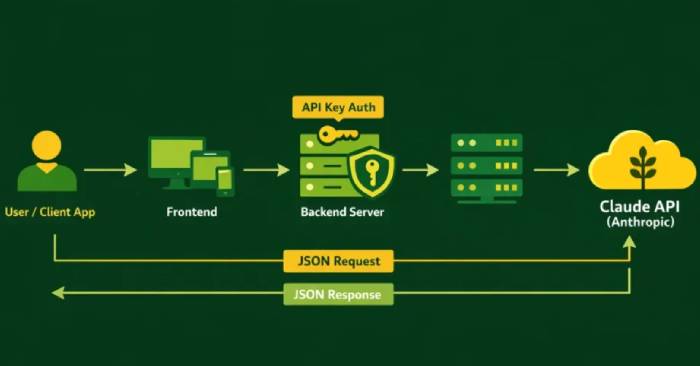
Integrating Claude API effectively is one of the most pressing questions organizations face when building serious AI applications. Anthropic's Claude API empowers companies to embed cutting-edge language models into web platforms, SaaS products, AI agents, and enterprise systems. This guide walks you through the essentials: obtaining your Claude API key, making secure API calls, managing token usage efficiently, controlling costs, and architecting AI systems that actually work at scale.
Artificial intelligence has moved beyond the lab. It's now a fundamental piece of how modern digital products are built. From AI-driven customer support systems to intelligent document analysis tools, companies are increasingly putting AI into production. But successful deployment requires more than just making API calls. You need solid architecture, proper governance, and performance planning that actually sticks.
If you're planning to bring Claude into your organization, this step-by-step guide helps you move beyond basic prototyping and into building scalable, secure AI systems. The kind of systems that won't embarrass you six months from now when you're dealing with production issues. We're talking real architecture, real scalability, the whole package.
What Is Claude API?
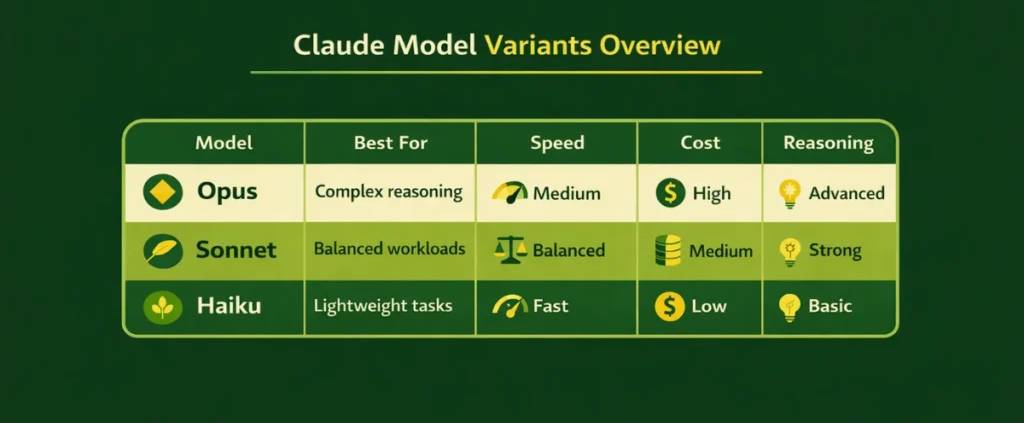
Claude API is Anthropic's interface that lets developers access powerful language models—Opus, Sonnet, and Haiku. It enables you to build text generation features, analyze data, create AI agents, and wire intelligent workflows together through clean REST API endpoints.
Think of it as the bridge connecting your application directly to Claude's intelligence.
Claude offers different model tiers for different needs:
- Opus – Best for complex reasoning and demanding tasks.
- Sonnet – Strikes a reasonable balance between performance and cost.
- Haiku – Optimized for speed and lightweight operations.
Which model you pick depends on your budget, expected latency, and task complexity.
REST Architecture
The API follows a standard REST design. Your application sends HTTP requests to Claude's endpoints, and the model responds with JSON-formatted answers.
JSON-Based Request and Response Handling
Everything flows through JSON. You send prompts inside a message array, and the API returns generated content plus usage metadata—things like token count. Clean and predictable.
Authentication via API Key
Security hinges on your API key. No key means no requests go through. So learning how to obtain your Claude API key and actually protect it is step one.
Step-by-Step: Getting Your Claude API Key
Here's how to get your hands on a Claude API key:
Step 1: Create an Anthropic Account
- Head to the Anthropic console.
- Sign up using your email address.
- Verify your email to activate the account.
Step 2: Access the Developer Dashboard
- Log into your console.
- Navigate to the API section.
- Generate a new API key.
This key is your secure access token for making API requests.
Step 3: Secure Your Key
- Store it in environment variables.
- Never hardcode it into frontend JavaScript.
- Don't commit it to public repositories.
Understanding how to use your Claude API key safely prevents unauthorized access and unexpected charges.
Using Your Claude API Key in Applications
Once you've generated your key, the next step is figuring out how to use it in actual code.
Method 1: Environment Variables (Recommended)
Store your key securely in your environment:
export ANTHROPIC_API_KEY="your_api_key_here"Then reference it in your backend application.
This is the safest and most professional approach to handling credentials.
Method 2: Direct Header Authentication (Development Only)
For quick testing during development:
x-api-key: your_api_key_hereThis works for local development but has no place in production.
Security Best Practices
- Use secret management services like AWS Secrets Manager, Google Cloud Secret Manager, or Azure Key Vault.
- Rotate your keys regularly.
- Enforce role-based access control.
Proper security measures build confidence and prepare your organization for scale.
Understanding Claude API Documentation (Developer Overview)
Official Claude API documentation can feel overwhelming at first. This simplified breakdown helps. What's interesting here is that understanding the docs structure itself is crucial for moving from proof-of-concept to actual production deployment.
Key Documentation Sections
The documentation breaks down into these main areas:
- Authentication – Explains how to use your API key for secure requests.
- Models Endpoint – Lists available Claude models and their capabilities.
- Messages Endpoint – Shows how to send prompts and receive responses.
- Streaming Responses – Covers real-time output handling.
- Rate Limits – Defines usage thresholds and request quotas.
- Error Codes – Helps diagnose and fix integration problems.
Request Structure
A standard request includes required headers (Content-Type and your API key), your chosen model, a max_tokens parameter, and a JSON-formatted messages array.
JSON Content Format
{
  "model": "claude-3-sonnet-20240229",
  "max_tokens": 1024,
  "messages": [
    { "role": "user", "content": "Explain in simple terms" }
  ]
}
Response Fields
The API returns generated content, a stop_reason explaining why the response ended, and usage data showing token consumption. Understanding these fields matters for monitoring performance, debugging, and controlling costs.
Claude API Code Examples (Node.js & Python)
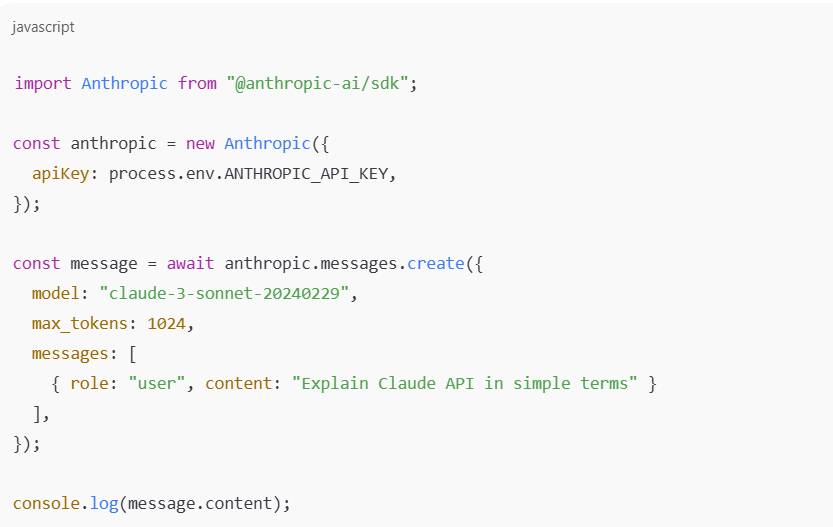
Here are working code examples to get you started immediately.
Node.js Example
Python Example
import anthropic

client = anthropic.Anthropic(api_key="YOUR_API_KEY")

response = client.messages.create(
  model="claude-3-sonnet-20240229",
  max_tokens=1024,
  messages=[
    {"role": "user", "content": "Write a product summary"}
  ]
)

print(response.content)
These examples show how to use Claude in real backend environments.
Real-World Claude API Applications
After mastering the basics, here's where Claude actually delivers value in production systems.
1. Chatbot Integration
- Customer support assistants
- SaaS help desk bots
- Knowledge base Q&A systems
Claude handles context-aware conversations with natural, helpful responses.
2. RAG Applications (Retrieval-Augmented Generation)
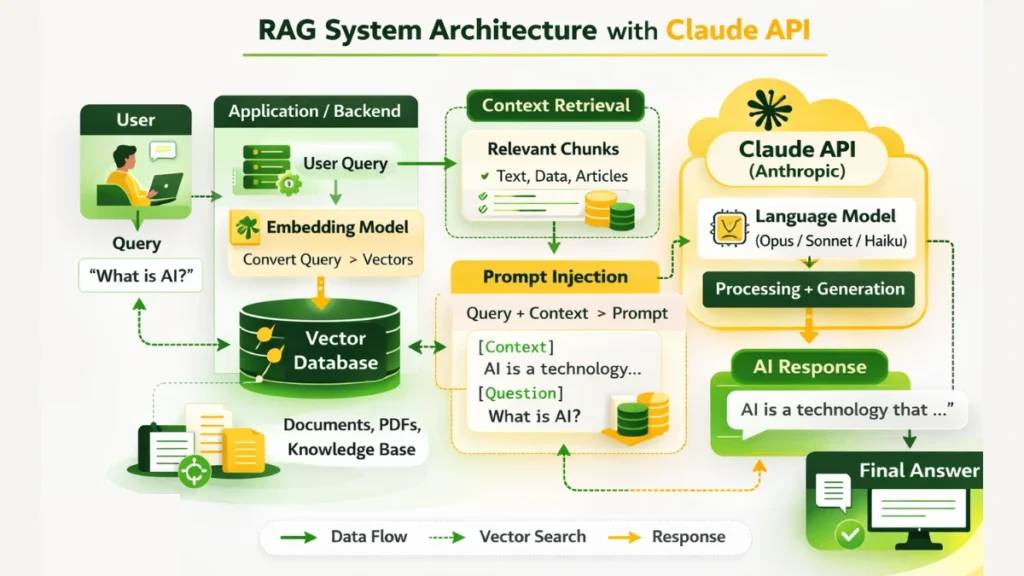
- Connect to vector databases
- Retrieve relevant context
- Inject context into prompts
This approach dramatically improves accuracy and domain-specific responses.
3. AI Agent Workflows
- Multi-step reasoning
- Tool calling
- Structured output generation
Frameworks like LangChain help orchestrate these complex pipelines efficiently.
Understanding Claude API Pricing
Before scaling any AI application, you need to understand pricing. The real concern is avoiding surprise bills that blow your budget. Smart cost planning prevents runaway expenses and ensures sustainable growth.
1. Token-Based Pricing Model
Claude charges per token used. You pay separately for:
- Input tokens (text you send as prompts)
- Output tokens (responses the model generates)
Both contribute to your total bill.
2. Cost Differences Across Models
Each Claude model has different pricing tiers:
- Opus: Higher cost, advanced reasoning capabilities
- Sonnet: Middle ground between performance and price
- Haiku: Most cost-effective, optimized for speed
3. Sample Estimate (1 Million Tokens)
If your application processes 1 million tokens monthly, costs vary by model. Sonnet typically offers the best balance of capability and affordability.
4. Cost Optimization Strategies
- Eliminate unnecessary context
- Keep prompts concise
- Monitor usage logs closely
- Choose the right model tier
Tight cost control ensures long-term scalability and predictable budgets.
Building Production-Ready Claude Applications
A production Claude application is more than just plugging in an API. It requires multiple architectural layers working in concert to deliver scalability, reliability, and maintainability.
Architecture Overview
Enterprise-grade setups typically include these four layers:
- Frontend Layer: React or Next.js interfaces that render responsive UIs and handle real-time AI conversations.
- Backend Layer: Node.js or FastAPI servers handling secure API request processing, user authentication, and business logic.
- LLM API Layer: Manages interaction between your backend and Claude—prompt handling, token management, and result processing.
- Database Layer: Stores user sessions, conversation history, vector embeddings, and application data.
- Monitoring & Logging Layer: Tracks system health, latency, errors, and performance metrics.
- Usage Tracking: Monitors token consumption and cost metrics.
What Matters
- Deploy observability dashboards for real-time insights
- Track token usage to prevent overspending
- Implement retry logic for temporary failures
- Build fallback model strategies for high availability
Strong architecture ensures reliable performance even under heavy traffic.
Common Errors (and How to Fix Them)
Developers implementing Claude API in production encounter predictable issues. Addressing these proactively prevents friction during testing and deployment.
1. Invalid API Key
This happens when the key is missing, incorrect, or not properly loaded from environment variables. Ensure your key is stored securely and referenced correctly in your backend configuration.
2. Model Not Found
An incorrect or outdated model version string causes requests to fail. Always verify the exact model name from official documentation before deploying.
3. Token Limit Exceeded
Exceeding the token limit results in truncated or failed responses. Lower max_tokens or shorten your prompt length to stay within limits.
4. Timeout Errors
Large prompts or high traffic can cause timeouts. Increase your server's timeout settings and optimize request size where possible.
5. JSON Format Issues
Malformed request payloads trigger validation errors. Use proper JSON validators before sending requests.
Proactive troubleshooting ensures smoother launches and more stable production systems.
Getting started with Claude API is straightforward. Create an account, generate a key, send structured requests. But scaling demands thoughtful architecture. Governance matters. Cost monitoring is essential. Organizations need a structured plan before rolling out AI broadly. The right architecture today saves costly redesigns tomorrow.
Description: Learn how to integrate Claude API into production applications. Get your API key, handle authentication securely, optimize token usage, and scale effe

No Comment to " Building AI Apps with Claude API: A Complete Developer Guide "