What Are Gemini Gems? How to Build Custom AI Chatbots in Google Gemini
Google's Gemini has evolved far beyond a simple question-answering chatbot. The platform now handles natural language coding, deep research, transforms documents into interactive courses, and tackles countless other tasks. But there's one particularly useful feature that Google originally highlighted with fanfare before quietly tucking it into settings—Gemini Gems.
Think of Gems as Gemini's answer to Custom GPT in ChatGPT. Instead of re-entering the same detailed prompt every single conversation, you set up a specialized AI assistant once and reuse it infinitely. Your Gem remembers its assigned role, communication style, and knowledge base—essentially becoming an "AI expert" tailored to your specific domain. Whether you need help brainstorming, creating content, or handling specialized work, a well-configured Gem delivers consistent results. Here's the thing though: the overlap between Gems, standard Gemini, and Gemini Notebook confuses plenty of people. Let's break down what Gems actually do and when you should use them.
Understanding Gemini Gems
Google describes Gems as "Custom AI Experts"—essentially, you're building a chatbot with a specific personality and dedicated purpose. You might create a Gem that specializes in career counseling, helps structure your project timeline, brainstorms marketing angles, or focuses on practically any other specialty you need.
Beyond basic instructions, Gems let you upload personal documents, link data from Google Drive, paste code snippets, or connect directly to Gemini Notebook to expand the knowledge your AI assistant can draw from. This flexibility means your Gem understands your specific context and requirements.
Here's a handy detail: you can designate default tools for your Gem. By default, it intelligently selects the right tool for each conversation. But if you want it to prioritize video, image, or music generation, you can lock that in. The Gem will consistently use your chosen tool type.
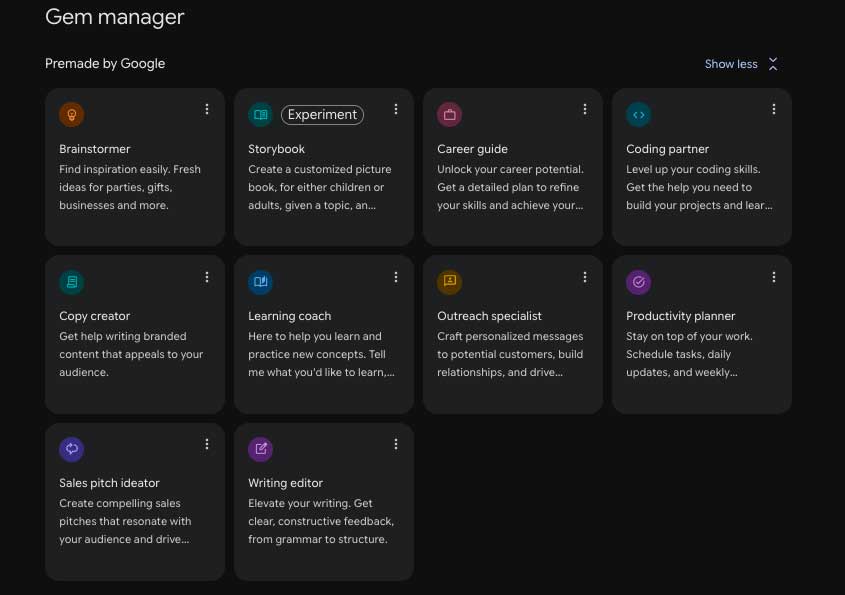
For newcomers, Google supplies ready-made Gem templates—Brainstormer, Career Guide, Productivity Planner, Sales Pitch Ideator, and others. You can customize these templates to match your needs rather than building from scratch.
How to Create a Gemini Gem
Creating a Gem is straightforward, though the quality of your AI assistant depends heavily on the instructions and data you provide. You can always return later to refine and improve how your Gem understands its role.
One important note: Gem creation only works on Gemini's web version right now. The mobile app lets you use existing Gems, but you'll need a browser to build new ones.
Here's the process:
- Log into Gemini.
- Click the Settings icon at the bottom of the left sidebar.
- Select Gems.
- Choose a Google template or click Create New to start fresh.
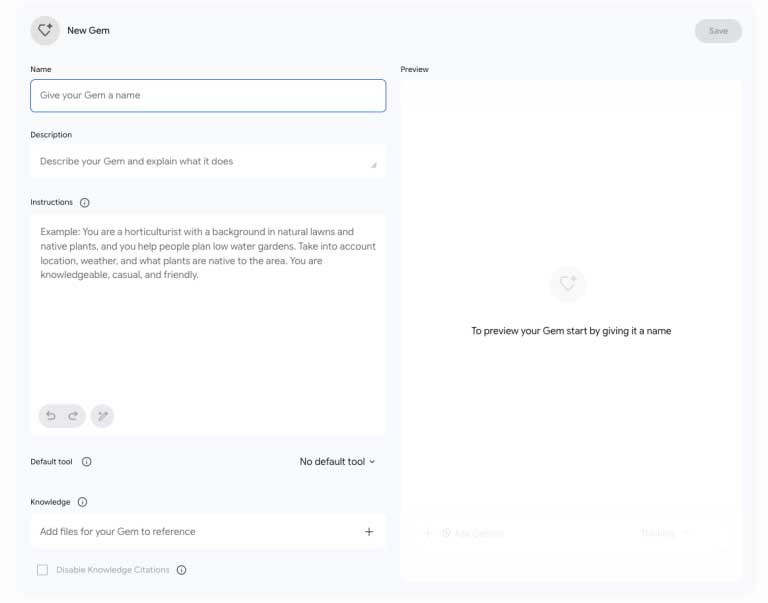
Then fill in the essentials:
- Name your Gem.
- Write a brief description of what it does.
- Enter detailed instructions.
- Set a default tool if needed.
- Upload supporting documents or data (optional).
- Hit Save.
Google provides thorough documentation for anyone wanting to build more sophisticated Gems.
How Well Do Gemini Gems Actually Work?
Here's an interesting real-world example: using a Gem for movie recommendations. With just a simple instruction like "you're a film expert" plus a list of favorite genres and movies, the Gem started asking follow-up questions to truly understand the user's taste before making suggestions.
The results were impressive—it recommended films the user loved that hadn't been listed in the setup. But here's where a limitation emerged. When asked to remember these new recommendations for future sessions, the Gem claimed it updated the "preference profile." Yet when checking the settings later, those additions weren't actually saved in the Instructions section. What's interesting here is that Google hasn't yet implemented persistent memory updates through conversation—other platforms like Claude Projects already handle this. The Gem can learn within one conversation but can't permanently retain new information unless you manually edit the settings.
Gems vs. Standard Gemini: When Should You Choose Gems?
Standard Gemini can handle almost everything a Gem does. Still, Gems offer meaningful advantages.
First, a Gem maintains consistent personality and response style based on its programmed instructions. Use regular Gemini and you're rewriting your entire request from scratch each conversation.
Second, Gems let you store reference documents in settings. No more uploading the same files repeatedly for every chat. Since Gems operate within a defined professional scope, they also tend to deliver more stable and coherent responses compared to general-purpose Gemini.
How Do Gems and Gemini Notebook Differ?
While powerful, Gems aren't always the right choice. At their core, Gems are AI chatbots that blend user-provided data with internet search results to create responses.
Gemini Notebook (formerly NotebookLM) works completely differently. It treats uploaded documents as the authoritative source and responds based exclusively on that material—no internet mixing.
A practical test showed these features can actually work together. After creating a Notebook with a favorite films list and linking it to a movie Gem, the chatbot used both the Gem's Instructions and the Notebook data simultaneously for more accurate recommendations. The real insight: connecting a Notebook doesn't restrict the Gem to that document. It still accesses internet information, using the Notebook as an additional context layer.
Gemini Gems remain one of Gemini's most useful yet underrated features. Rather than repeating the same prompt endlessly, build specialized AI assistants for consulting, research, planning, or content creation. Gemini Notebook fits better when you need AI working strictly from internal documents without web data bleeding through.
Combine Gemini, Gems, and Notebook strategically, and you'll have highly personalized AI assistants that far outperform generic chatbots.
Description: Learn how to create personalized AI experts with Gemini Gems. Build specialized chatbots for your specific needs without repeating prompts.
Related Articles
- What Is DeepSeek Harness? An Open-Source Agent Runtime Explained
- Create a National Day Celebration Video: A Step-by-Step Guide
- Claude Code vs Cursor: Which AI Coding Assistant Should You Choose in 2025?
- Google's DiffusionGemma: A Radically Different Approach to Text Generation
- How to Use Perplexity's Learn Step by Step Mode: A Complete Guide

No Comment to " What Are Gemini Gems? How to Build Custom AI Chatbots in Google Gemini "