How to Use Claude AI for Accurate and Efficient Programming

Programming can be both exhilarating and frustrating. One moment you're crafting an elegant function. The next, you're stuck battling a stubborn bug that refuses to go away.
This is where AI programming assistants like Claude AI become invaluable. Think of it as a coding partner available 24/7, ready to generate code snippets, fix bugs, and write documentation while you focus on solving the actual problem.
Claude can create functions, refactor messy code, and explain complex algorithms like a patient tutor. But to truly unlock its potential, you need the right approach. The tool is powerful, but getting the best results requires knowing how to ask the right questions.
Let's explore Claude AI's strengths and weaknesses together. You'll discover how to leverage its capabilities effectively and identify where you might need additional tools. Ready to code smarter? Let's go.
Table of Contents
How to Use Claude AI for Programming
Claude AI can be a powerful coding assistant when used correctly. From creating functional snippets to debugging and writing documentation, it streamlines your workflow when given clear, well-structured instructions.
Here's how to get the best results:
Step 1: Set Up Claude AI for Coding Support
Before you start, you'll need access to Claude AI. If you don't have an account yet, sign up on Anthropic's platform and ensure you have the necessary permissions to interact with Claude's API if you're using programmatic access.
To get started:
- Log into Claude AI and open a conversation window
- Set the context for your request—Claude performs best with clear instructions
- Specify your programming language upfront to get accurate results
💡 Example prompt:
I'm working in Python and need a function to convert nested JSON files to CSV format. Can you create an optimized function for this?Step 2: Generate Code Snippets with Claude AI
One of the biggest time-savers in programming is getting working code snippets instantly. Instead of rewriting boilerplate or hunting through Stack Overflow for partial solutions, you can ask Claude AI to generate precise, optimized code tailored to your needs.
The quality of Claude's output depends entirely on how well you structure your request. A vague prompt like "Write a sorting function in JavaScript" won't give you exactly what you need. But a detailed, well-structured request produces clean, reusable code.
Sorting an Array of Objects in JavaScript
Imagine you're building an e-commerce site that displays product listings. Users want to sort items by price, so you need a function that sorts an array of objects by price in ascending order.
Basic prompt:
Write a JavaScript function that sorts an array of objects by the 'price' property in ascending order.
That's clean, functional code—but let's take it one step further.
Enhance Output with Additional Context
What if your data sometimes includes missing or invalid prices? Rather than risk NaN errors or unexpected behavior, refine your prompt:
Better prompt:
Write a JavaScript function that sorts an array of objects by the 'price' property in ascending order. Make sure it handles missing or invalid price values gracefully.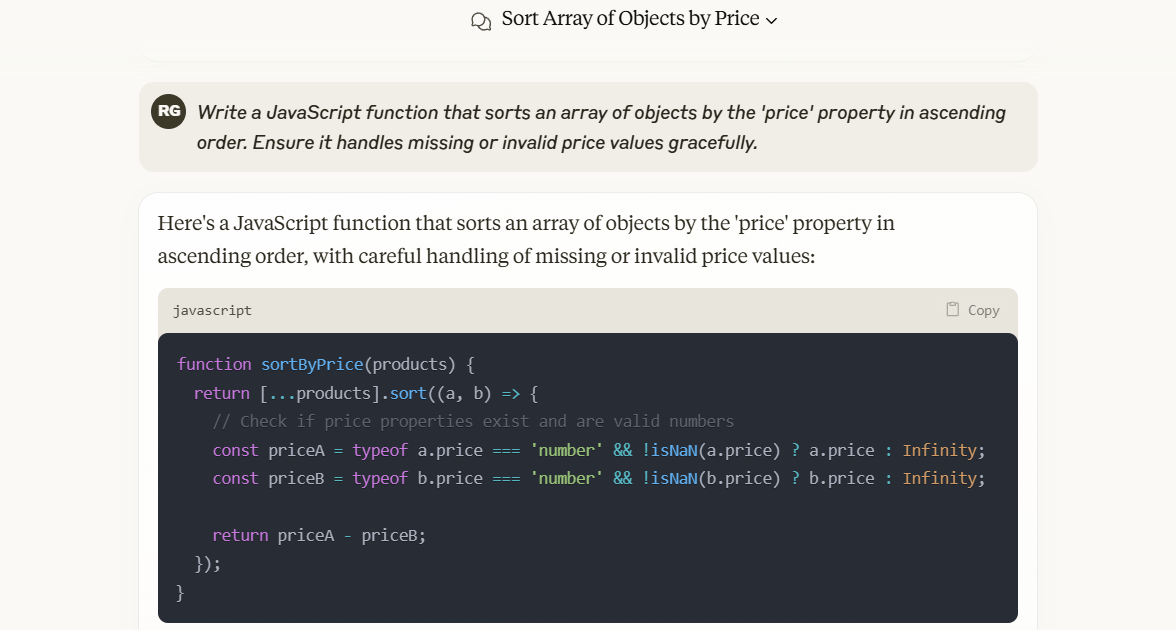
Now any object without a valid price gets pushed to the end of the list instead of breaking the function. This makes your code more robust for real-world scenarios.
Customize Further
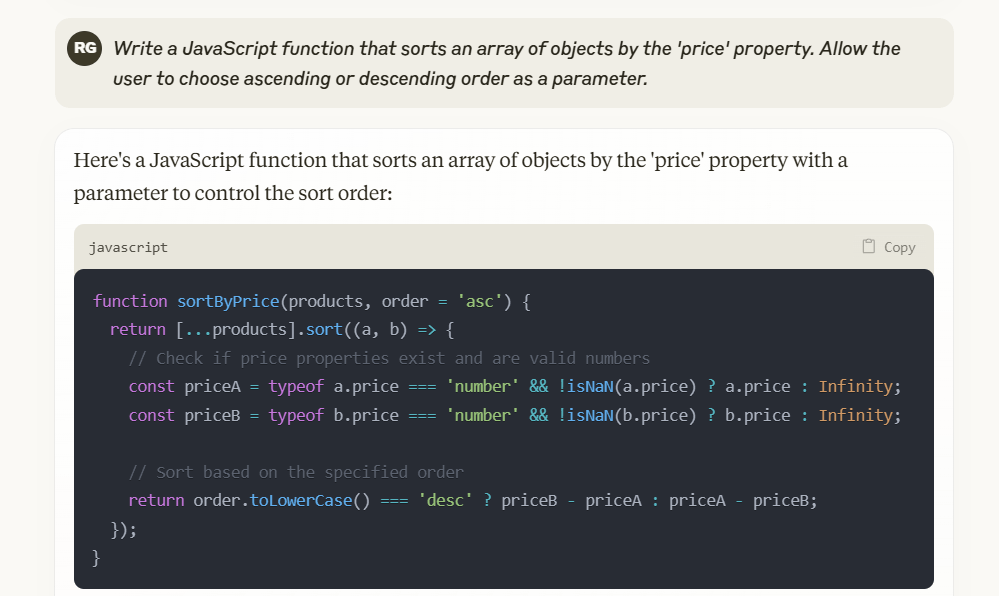
What if you want more flexibility—maybe the function should allow sorting in both ascending and descending order based on user preference?
Advanced prompt:
Write a JavaScript function that sorts an array of objects by the 'price' property. Allow users to choose between ascending or descending order as a parameter.Key Takeaways When Generating Code with Claude AI
- Be specific in your prompt: More detail equals better results
- Consider edge cases: Ask Claude to handle missing values, errors, or scalability concerns
- Request flexibility when needed: Functions become more powerful with optional parameters
- Review AI-generated code carefully: While Claude is powerful, always test the logic and verify output
By structuring prompts effectively, Claude AI helps you create high-quality, reusable code snippets with minimal effort.
Step 3: Debug Code Using Claude AI
No matter how clean your code is, bugs always find a way in. Whether it's a runtime error, infinite loop, or unexpected API behavior, debugging can eat up hours—unless you know how to use Claude AI effectively.
Claude can analyze your code, identify issues, and suggest fixes in seconds. But getting accurate debugging help depends on how well you present your request.
A vague prompt like "my code doesn't work" won't help much. A well-structured one will.
Fix a TypeError in Python
You're processing API data in Python and hit this classic error:
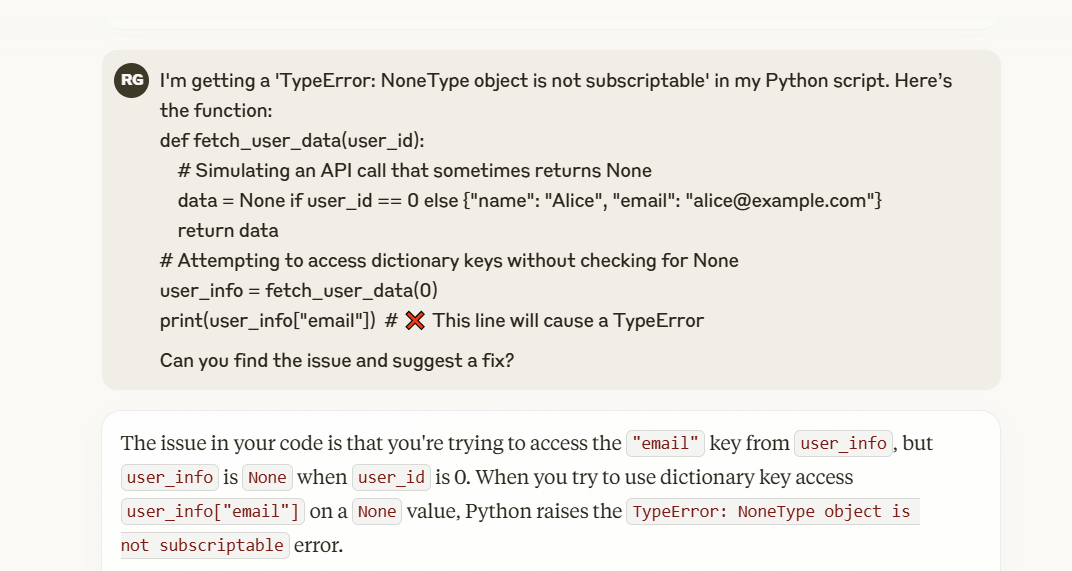
TypeError: 'NoneType' object is not subscriptableInstead of hunting through your code yourself, let Claude do the work.
Prompt:
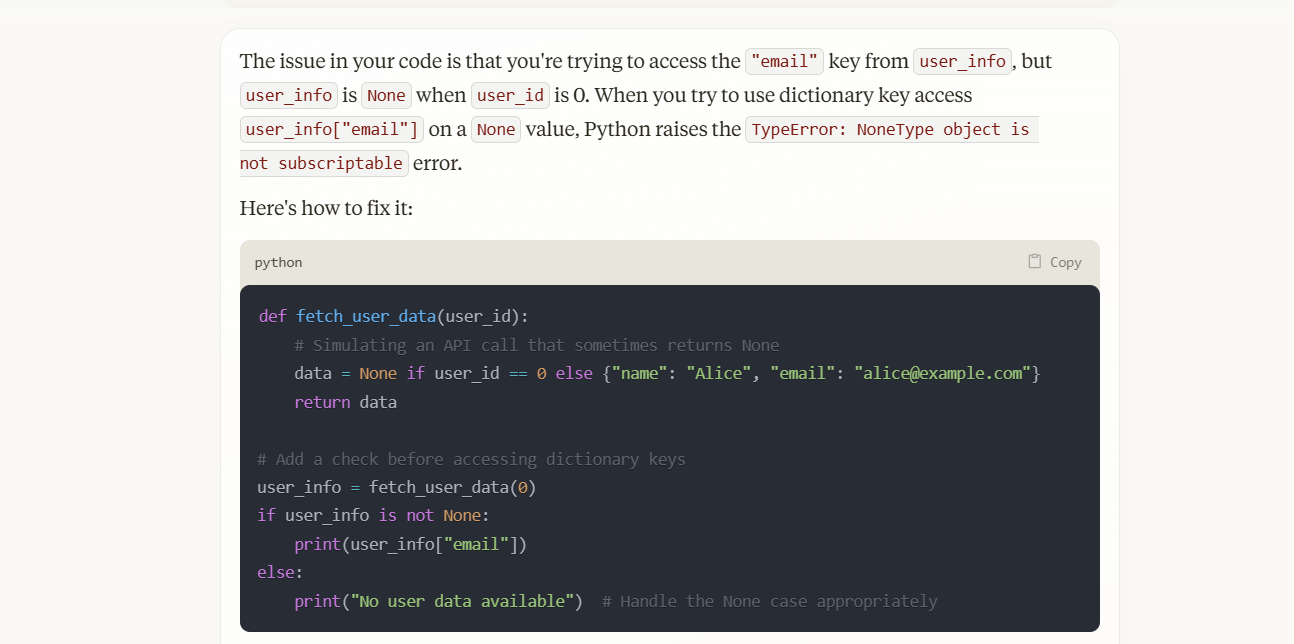
I'm getting a 'TypeError: NoneType object is not subscriptable' error in my Python code. Here's the function. Can you find the issue and suggest a fix?Claude scans your code and identifies the problem:
- The function returns None when the API request fails
- You're trying to access a key from a NoneType object
Claude's proposed solution:
Handle Undefined Properties in JavaScript
You're building a React app, and your API call returns inconsistent data. Suddenly the app crashes with:
Uncaught TypeError: Cannot read properties of undefined (reading 'email')Instead of manual logging and trial-and-error debugging, feed the error to Claude AI.
Prompt:
My React app crashes when trying to read 'email' from an API response. How can I safely handle undefined properties?Claude identifies the root cause:
- API responses don't always return the user object
- You need optional chaining to prevent crashes
This technique prevents runtime failures and keeps your UI working even when data is missing.
Optimize Slow SQL Queries
Claude AI can help identify performance bottlenecks in complex queries.
Example:
Your database query takes too long to execute. Instead of tuning manually, ask Claude for solutions.
Prompt:
My SQL query runs too slowly on large datasets. Can you suggest performance improvements?Claude might recommend:
- Indexing the right columns to speed up lookups
- Using EXPLAIN to analyze execution plans
- Optimizing joins by selecting only necessary columns
With Claude's suggestions, you rewrite your SQL query for faster, more efficient execution.
Key Takeaways When Debugging with Claude AI
- Provide full context: Include error messages and relevant code for accurate feedback
- Ask for explanations: Understanding why an error occurred helps prevent it in the future
- Request alternative solutions: If the first fix doesn't work, ask Claude for other approaches
- Use it for performance too: Claude can analyze performance issues, refactor loops, and suggest better approaches
Debugging doesn't have to be time-consuming or frustrating. With structured prompts, Claude AI helps you fix bugs faster, optimize performance, and write more robust code.
Step 4: Write Source Code Documentation with Claude AI
Good documentation isn't just a bonus—it's essential. Whether working solo or with a team, clear documentation saves time, prevents confusion, and makes debugging easier.
The problem is documentation takes forever and usually gets deprioritized. That's where Claude AI shines. It can generate function descriptions, structured docstrings, and even explain complex algorithms—as long as you provide clear context.
Create Function Docstrings in Python
You've written a function, but without a docstring, anyone reading it will struggle to understand what it does. Instead of manually documenting each function, ask Claude AI to create a detailed docstring.
Example function:
def fetch_user_data(user_id):
    data = get_api_data(user_id)
    if not data:
        return None
    return {"name": data["name"], "email": data["email"]}
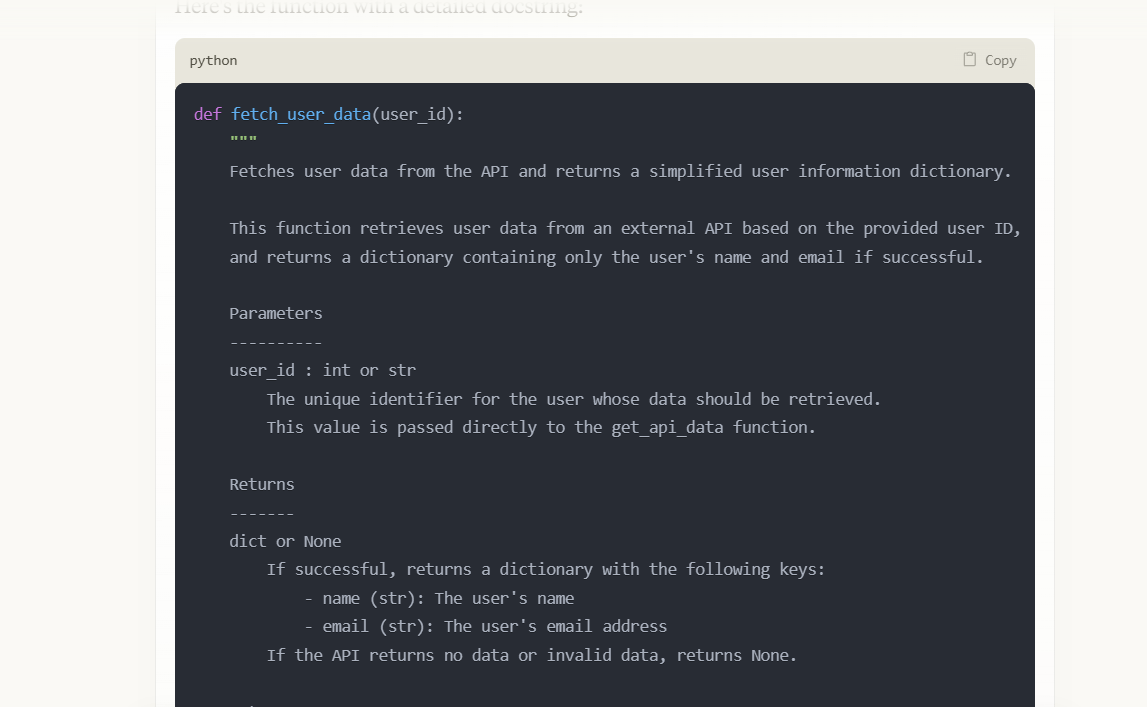
The function works, but what does it do? What parameters does it accept? What does it return? Let Claude create a complete docstring.
Prompt:
Add a detailed Python docstring to this function, explaining the parameters, return values, and error handling.Claude's result:
Now any developer instantly understands what the function does without reading every line of code.
Explain Complex Algorithms in Plain Language
You've implemented an advanced algorithm, but a junior colleague (or future you) might struggle to understand the logic. Claude AI can break down the logic into easy-to-understand explanations.
For example, you've written a binary search function that needs a full explanation.
def binary_search(arr, target):
    left, right = 0, len(arr) – 1
    while left <= right:
        mid = (left + right) // 2
        if arr[mid] == target:
            return mid
        elif arr[mid] < target:
            left = mid + 1
        else:
            right = mid – 1
    return -1
Instead of writing the explanation yourself, ask Claude.
Prompt:
Explain this binary search function in simple terms, including how it works and its time complexity.Claude's result:
This simplifies the algorithm, making it understandable without diving into every line of code.
Create API Documentation
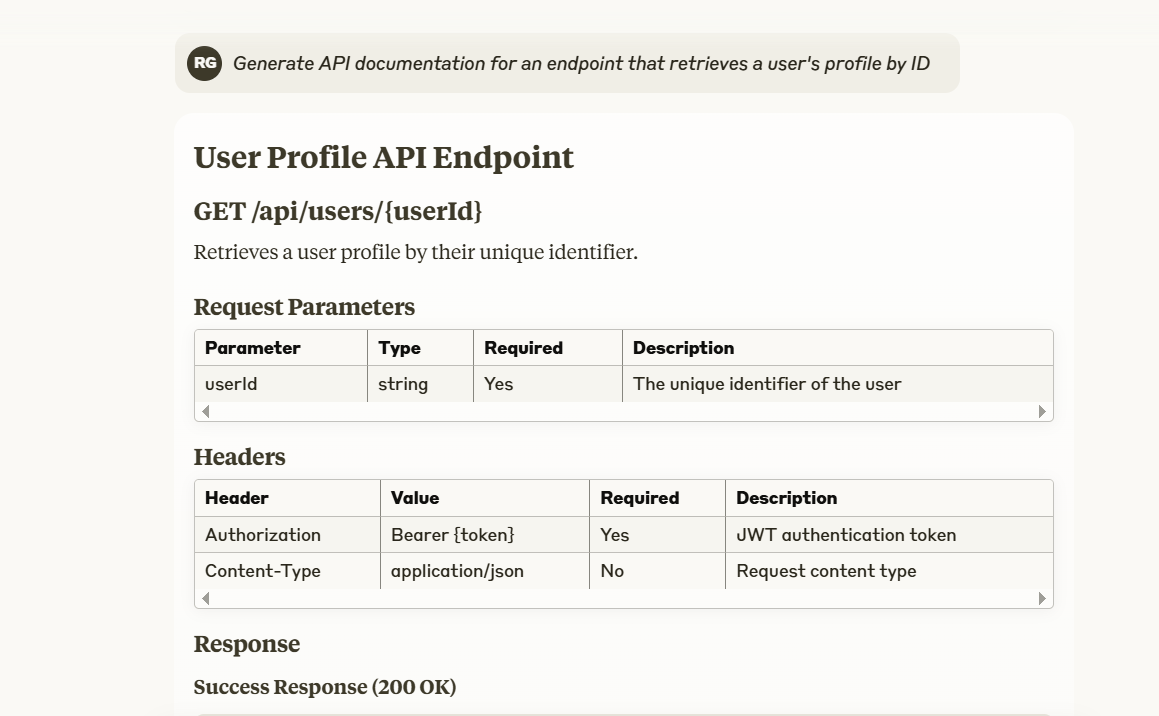
When building an API, you need structured documentation for endpoints, request formats, and response examples. Instead of writing from scratch, Claude AI can generate well-structured API docs in Markdown.
Prompt:
Create API documentation for an endpoint that retrieves a user profile by ID.Claude's result:
Step 5: Refine and Optimize Code with Claude AI
Writing code is one thing. Ensuring it runs efficiently is another. Poorly optimized code slows applications, increases server costs, and creates unnecessary technical debt. Instead of manually tweaking each inefficiency, Claude AI can identify slow code and suggest optimizations.
From eliminating redundant calculations to improving database queries, Claude can analyze inefficiencies and provide smarter, more scalable solutions. The key is knowing what optimizations to ask for.
Fix Inefficient Loops in Python
Loops are essential, but poorly written ones can drastically hurt performance. Say you've written a function to check if an element exists in a list:
def check_existence(lst, target):
    for item in lst:
        if item == target:
            return True
    return False
This works, but for large datasets it's inefficient. The function scans the entire list sequentially, giving O(n) time complexity.
Instead of finding a better approach yourself, ask Claude AI to optimize it.
Prompt:
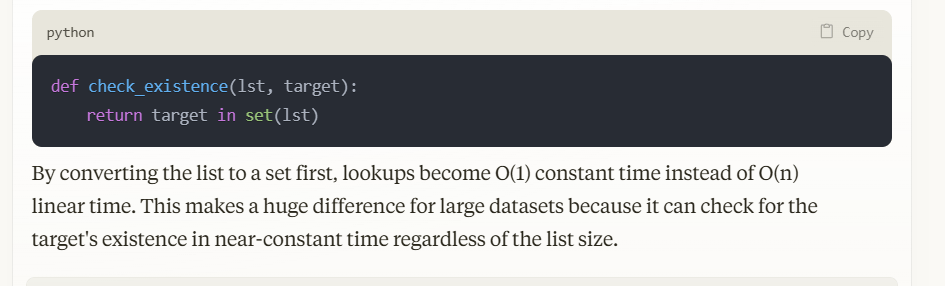
This function checks if an item exists in a list, but it's slow for large datasets. Can you optimize it?Claude's optimized version:
Why This Works Better
- Converting a list to a set reduces search time from O(n) to O(1)
- Dramatically improves performance for large lists
- Leverages Python's built-in data structures efficiently
Optimize SQL Queries for Faster Execution
Slow database queries are a common bottleneck in applications. Say you have a SQL query that retrieves user data but runs too slowly:
SELECT * FROM users WHERE email = 'user@example.com';Instead of tuning the query manually, ask Claude AI to improve performance.
Prompt:
My SQL query runs too slowly when searching for users by email. Can you optimize it?Claude's optimization suggestions:
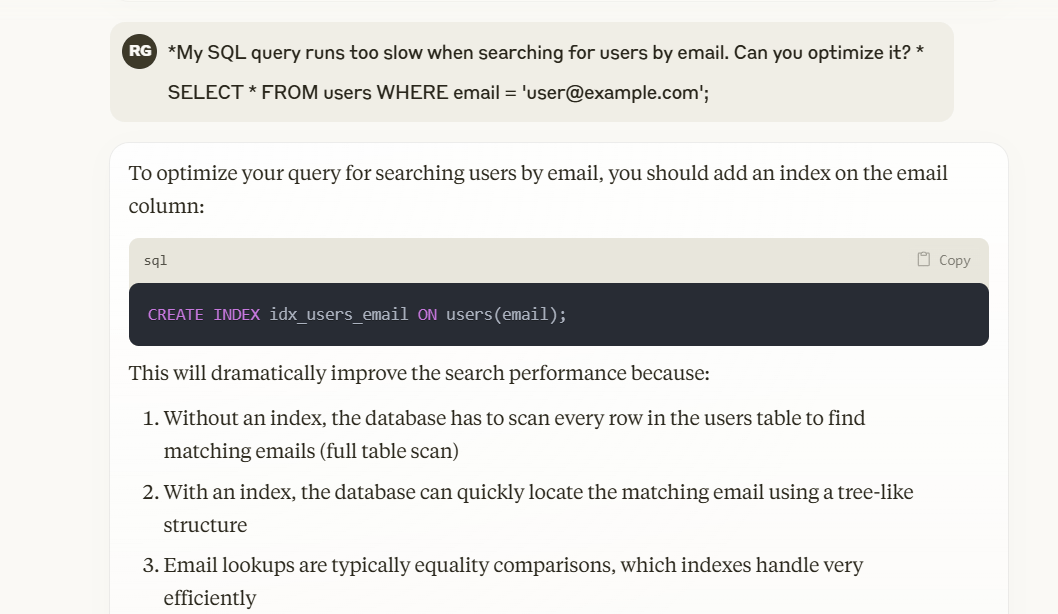
Why This Works Better
- Adding an index enables much faster lookups
- Reduces query execution time from O(n) to O(log n)
- Improves database performance without changing application logic
Reduce Redundant Calculations in JavaScript
Redundant calculations can slow down UI applications, resulting in sluggish user experience.
Say you've written a JavaScript function to filter unique values from an array:
function getUniqueValues(arr) {
    let result = [];
    for (let i = 0; i < arr.length; i++) {
        if (!result.includes(arr[i])) {
            result.push(arr[i]);
        }
    }
    return result;
}
This approach works, but it uses nested loops, giving O(n²) time complexity. Instead of debugging manually, ask Claude AI to handle it.
Prompt:
This function removes duplicates from an array, but it's slow for large datasets. Can you optimize it?Claude's optimized version:
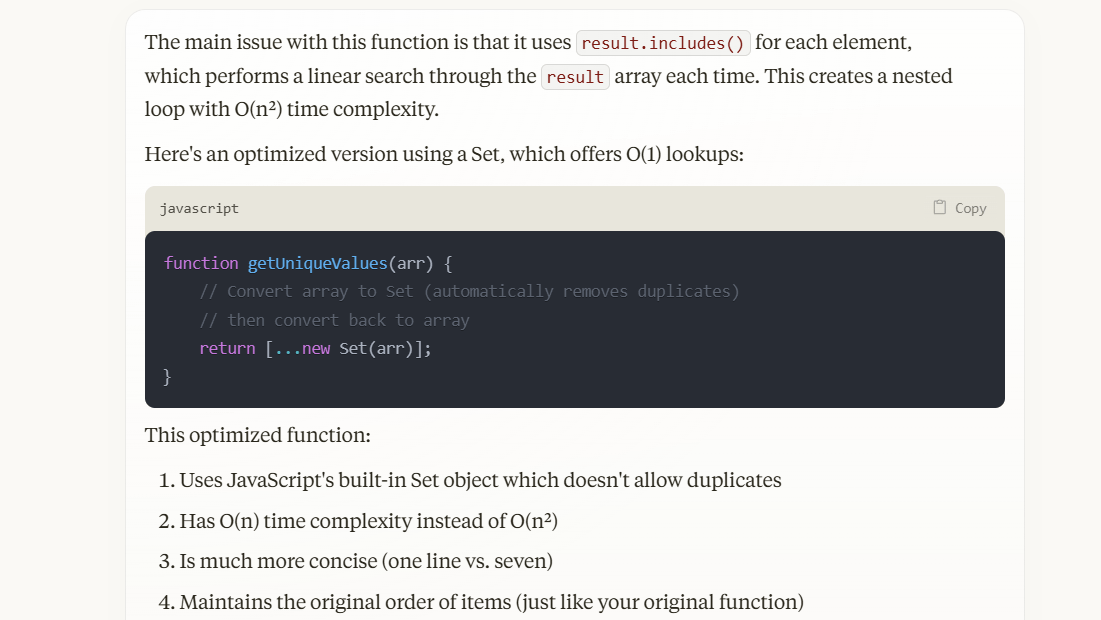
Why This Works
- Uses JavaScript's built-in Set method to eliminate duplicates in O(n) time
- Removes unnecessary loops for better performance
- Simplifies code while improving speed
Key Takeaways for Optimizing with Claude AI
- Identify performance bottlenecks: If your code runs slowly or inefficiently, ask Claude AI for restructuring suggestions
- Leverage built-in optimizations: Claude can suggest better data structures, indexing techniques, and caching strategies
- Always review AI recommendations: While Claude provides excellent insights, always verify and test output before deploying
- Optimize for scalability: AI-suggested optimizations should work not just with small datasets but scale efficiently as growth increases
By using Claude AI as an optimization tool, you can write cleaner, faster, more efficient code with less manual effort.
Limitations of Using Claude AI for Programming
Claude AI is powerful, but like any AI assistant, it has limitations. While it can generate code snippets, debug issues, and optimize functions, it can't replace human expertise. Understanding its weaknesses helps you use it more effectively and avoid potential pitfalls.
Here are the main limitations to keep in mind:
1. Lack of Real-Time Collaboration
Claude AI can't integrate directly into collaborative development environments like GitHub, GitLab, or VS Code Live Share. Unlike pair programming with a colleague, it doesn't track project changes, understand team workflows, or integrate feedback in real time.
What does this mean for you?
- Use Claude AI for personal coding support, but rely on version control tools for real-time team collaboration
- Combine Claude's suggestions with peer code reviews to catch issues you might miss
2. Limited Debugging Capabilities
Claude AI can analyze error messages, suggest fixes, and refactor code, but it doesn't execute programs or interact with runtime environments. It can't perform step-through debugging, detect memory leaks, or test edge cases within a project.
This makes it useful for catching syntax errors and logical bugs, but real-world issues still need manual debugging. To ensure accuracy, always run and test AI-generated fixes in your development environment before applying them to production code.
3. Difficulty with Complex Project Structures
Claude AI performs best with standalone code snippets but lacks visibility into entire projects. It doesn't recognize dependencies between files, module imports, or large-scale architectural patterns.
If you ask it to modify a function without full project context, it might suggest changes that break other components or conflict with existing logic. To avoid this, break requests into specific, clear tasks and provide additional context when asking for code that involves multiple files.
4. Risk of Outdated or Inaccurate Code
AI models rely on training data rather than real-time updates. This means Claude AI might suggest:
- Deprecated functions and syntax: For example, recommending class-based React components instead of modern function components with hooks.
- Unsafe SQL queries: It might generate database queries without proper input sanitization, increasing the risk of SQL injection attacks.
- Obsolete libraries or frameworks: Claude might suggest dependencies that aren't maintained anymore or have known security vulnerabilities.
5. Security Vulnerabilities in AI-Generated Code
Claude AI doesn't automatically apply security best practices when generating code. If asked to write authentication logic, API requests, or database queries, it might:
- Suggest hardcoding credentials, creating security vulnerabilities.
- Generate SQL queries without proper input validation, increasing SQL injection risk.
- Skip data validation steps, making apps vulnerable to malicious input attacks.
Developers using AI-generated code must always review for security gaps, apply proper encryption standards, and follow authentication and data protection best practices. AI should support the coding process—not replace critical security measures.
Claude AI can boost your programming speed and efficiency, but it can't replace human oversight. To get the most from Claude AI, use it as a programming assistant rather than a replacement for established best practices.
Description: Master Claude AI for coding: generate snippets, debug errors, write docs, and optimize performance with practical prompts and real examples.
Related Articles
- 5 Safety Guardrails Built Into Claude Code to Stop Costly Terminal Mistakes
- Create a National Day Celebration Video: A Step-by-Step Guide
- Why Developers Are Ditching Claude Code for Codex
- Google Flow Music: Generate Professional Music Videos with Just a Text Prompt
- How to Send WhatsApp Messages Directly from Google Gemini

No Comment to " How to Use Claude AI for Accurate and Efficient Programming "