Four Practical Ways to Deploy Large Language Models in 2025
Deploying a large language model isn't just about downloading an AI model and hitting run. Getting an LLM into production requires choosing the right GPU infrastructure, setting up a model serving engine, configuring APIs, and building auto-scaling to handle growing user demand. The choices you make here will ripple through your entire stack—affecting costs, control, performance, and operational overhead.
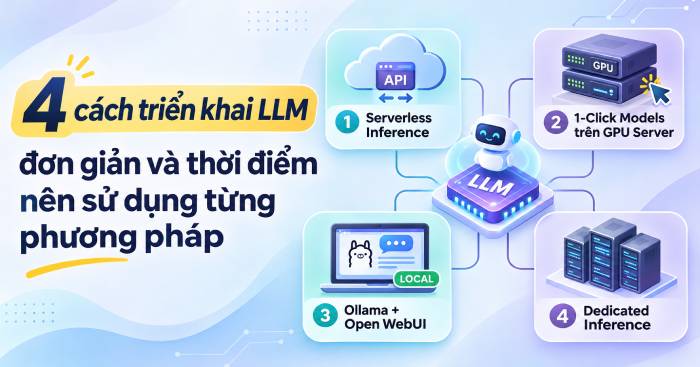
Today, you've got multiple paths forward. You can use managed APIs without touching infrastructure. You can spin up GPU servers and run models yourself. You can build dedicated inference endpoints. Or you can experiment locally with tools like Ollama. Each approach trades off cost, control, performance, and complexity in different ways.
Let's explore four practical LLM deployment strategies for 2025, examining the strengths and weaknesses of each, plus when to use them. We'll focus on real implementations using DigitalOcean solutions to show you how these choices actually work in practice.
Quick Navigation
- What LLM Deployment Actually Means
- Serverless Inference: Managed APIs
- GPU Droplets: Self-Hosted on VMs
- Ollama + Open WebUI: DIY Chatbot Stack
- Dedicated Inference: Enterprise GPU Resources
- Which Deployment Method Should You Pick?
- Which Model Should You Start With?
- When to Migrate to a More Complex Setup
- Which Platform Should Host Your LLM?
What LLM Deployment Actually Means
LLM deployment is the process of putting a trained language model into a production environment so applications and users can send requests and receive responses.
A functioning LLM deployment stack has four essential pieces:
- Model weights: The trained parameters that determine how the model understands and generates text.
- Inference engine: The software that runs predictions—think vLLM or Ollama.
- API layer: The interface that lets applications send requests and receive responses.
- GPU/CPU infrastructure: The actual computing power needed to run the model and process user requests.
Beyond those four components, your deployment environment also needs supporting software: GPU drivers, compatible libraries, and scaling rules. NVIDIA GPUs typically use CUDA, while AMD GPUs might run ROCm. Getting this foundation right determines whether your deployment will be fast, reliable, and cost-effective.
The deployment method you choose directly impacts your ability to balance performance against costs and your level of control over the system.
Serverless Inference: Managed APIs
Serverless Inference is your move if you want LLM capabilities in your application without running your own GPU servers.
Instead of hosting a model yourself, you make API calls to a provider's managed service. They handle the infrastructure, scaling, and inference—you just send requests and pay for what you use.
DigitalOcean's Serverless Inference gives you access to multiple model families through a single API: GPT, Claude, Llama, DeepSeek, Qwen, and Kimi. Developers can experiment with different models without installing anything on their own servers.
The real advantages
- Deploy fast: No GPU setup, no driver installation, no inference engine configuration needed.
- Easy integration: Send requests via API, get responses back.
- Model flexibility: Test different models without rebuilding infrastructure.
- Pay-as-you-go pricing: You're charged per token processed, not for idle GPU time.
- Cost optimization: Prompt caching can cut costs by up to 90% for repeated content, according to DigitalOcean's documentation.
DigitalOcean also offers an Inference Router (public preview) for request routing and a BYOM (Bring Your Own Model) feature that lets you deploy your own models from Hugging Face or DigitalOcean Spaces in Safetensors format.
When to use Serverless Inference
Pick this method if you:
- Want to add LLM features to an app without managing infrastructure.
- Are building chatbots, AI assistants, or text processing tools.
- Need to test multiple models before committing to one.
- Have variable request loads and don't want to pay for always-on GPU resources.
The tradeoff: You have less control over infrastructure and how the model runs compared to self-hosting. Also watch your token spending—costs add up fast with heavy usage.
GPU Droplets: Self-Hosted on VMs
Want more control over your model and runtime environment? Deploy on GPU Droplets instead.
DigitalOcean's GPU Droplets come with a 1-Click Models option. Rather than configuring everything from scratch, you start with a pre-configured environment that includes Docker and vLLM. You pick the model from Hugging Face, and you're running inference within minutes.
How it works
The environment comes with an Inference Ready setup that includes everything needed to run models. After launching a GPU Droplet, you load your chosen model and use vLLM to handle inference requests.
You can apply several optimization techniques:
- Speculative decoding: Speeds up token generation.
- FP8 quantization: Reduces memory requirements and boosts performance when compatible.
- vLLM: A high-performance serving engine for efficient request handling.
Key strengths
- Choose your own models: Load and run models from Hugging Face that fit your needs.
- Control your environment: Tweak configurations and adjust how the model operates.
- Optimize performance: Apply techniques like speculative decoding and quantization if your hardware supports them.
- Predictable billing: Pay per hour of GPU time, not per token.
What's challenging
You're responsible for more moving parts. Monitor server health, patch software, handle errors, and set up scaling when demand grows. The model you run depends on your GPU type and available memory—one Droplet typically runs one model, so multiple models mean multiple Droplets.
When to use GPU Droplets
Go this route if you:
- Want to self-host and control your LLM deployment.
- Need to run open-source or custom models.
- Want to tune inference settings for your application.
- Have technical staff who can manage servers and software.
Ollama + Open WebUI: DIY Chatbot Stack
If your goal is experimenting with LLMs or building an internal chatbot interface, combining Ollama with Open WebUI is straightforward and quick.
Ollama downloads and runs large language models locally. Open WebUI provides a ChatGPT-like chat interface. Combine them on a single server, and you've got your own LLM chatbot environment without building a UI from scratch.
Deployment steps
DigitalOcean provides a 1-Click App for Ollama + Open WebUI on a Droplet. The basic flow:
- Create a Droplet and select the Ollama + Open WebUI app.
- Launch with appropriate resource settings.
- Access the Open WebUI interface.
- Set up an admin account.
- Pull models from Ollama.
- Start chatting and experimenting.
For smaller models, a CPU Droplet works fine for testing. For larger models or if you need faster responses, upgrade to a GPU Droplet.
Why this approach works well
- Low friction: No need to build your own chat interface.
- Self-hosted: Your model and interface run on infrastructure you control.
- Great for exploration: Quickly test different models.
- Internal use: Perfect for building team or company chatbots.
Real limitations
Performance depends heavily on your server resources and model size. Running a large model on CPU will be slow. You also need to manage the server yourself: software updates, security (definitely set up HTTPS), and access controls before using this in production.
When to use Ollama + Open WebUI
Choose this if you:
- Want to build an internal AI chatbot.
- Need to experiment with open-source models.
- Want to build a prototype before developing a full product.
- Want to learn how self-hosted LLM deployment works.
Dedicated Inference: Enterprise GPU Resources
Once your application has stable traffic or specific inference performance requirements, consider Dedicated Inference.
Unlike Serverless, this approach allocates GPUs exclusively for your deployment. You choose the model, GPU type, region, and resource quantity. It's a more hands-on approach for teams ready to scale beyond basic options.
DigitalOcean's Dedicated Inference lets you deploy private or public inference endpoints. Endpoints support OpenAI-compatible APIs, making integration into existing applications straightforward.
How it operates
Dedicated Inference runs on GPUs reserved for your use. The platform uses vLLM and llm-d on Kubernetes to serve models and manage deployments.
You configure:
- Which model to deploy.
- GPU type and quantity.
- Geographic region.
- Whether endpoints are private or public.
According to DigitalOcean's documentation, regions include ATL1, NYC2, and TOR1.
Main benefits
- Dedicated GPU resources: Your GPUs aren't shared with other workloads.
- High control: Choose your model, GPU configuration, and deployment settings.
- Private endpoints: Set up public or private access depending on your security needs.
- Steady workloads: Good for applications that need consistent inference capacity.
The real costs
Dedicated Inference charges by GPU-hour, meaning you pay even if your endpoint sits idle. That's a significant factor for applications with unpredictable or low traffic—you could end up paying for unused capacity. You'll also need technical expertise to manage models, endpoints, and infrastructure.
When to use Dedicated Inference
Consider this if you:
- Run an AI application with steady request volume.
- Need precise control over GPU resources and inference performance.
- Want dedicated endpoints for your product or service.
- Have specific requirements around deployment region or infrastructure configuration.
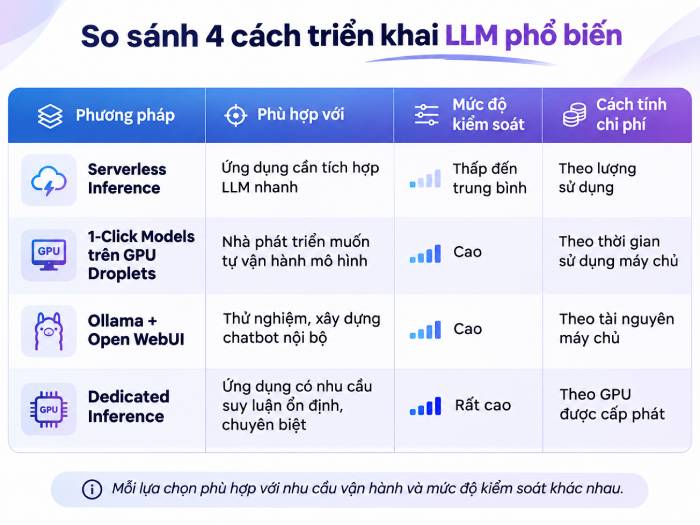
Which Deployment Method Should You Pick?
There's no universal answer. The best choice depends on traffic patterns, budget, performance requirements, and your team's infrastructure expertise. Here's a quick decision guide:
| Your Requirement | Best Approach | Why |
|---|---|---|
| Add LLM features to an app quickly | Serverless Inference | No GPU management needed |
| Run your own open-source models | GPU Droplets | Full control over model selection and configuration |
| Build an internal chatbot or prototype | Ollama + Open WebUI | Ready-made chat interface and model runner |
| Deploy at scale with consistent traffic | Dedicated Inference | Dedicated GPU capacity available always |
But before you decide, think through three critical factors:
1. Traffic Patterns
Sparse, irregular requests? Pay-per-use services avoid the waste of idle GPUs. Consistent, heavy traffic? Dedicated resources give you predictability and control.
2. Total Cost of Ownership
Don't just compare GPU prices or token costs. Factor in storage, server uptime, maintenance, monitoring, and engineering salaries. What's interesting here is that Serverless cuts operational overhead but can spiral in cost with volume, while Dedicated Inference pays GPU-hours regardless of utilization.
3. Control Needs
Self-hosted options (GPU Droplets, Ollama) give you freedom to pick models and tune settings. Managed APIs sacrifice control for simplicity.
Which Model Should You Start With?
After picking your deployment approach, you'll need to pick a model. People often make the mistake of jumping straight to the biggest, most powerful model available. That's usually wrong.
Start small. Test with a modest model to understand output quality, inference speed, and resource consumption before scaling up.
Some models worth considering:
- Ministral 3 14B: 14 billion parameters, good for tasks needing more capability than smaller models.
- Nemotron Nano 12B v2 VL: Multimodal model supporting both text and image processing.
- gpt-oss-120b: Large-scale option for workloads demanding serious computational power.
If self-hosting, start with open-source models under 10 billion parameters. They're more hardware-friendly and make experimentation accessible.
Evaluate any model on:
- Output quality for your specific use case.
- Model size and memory requirements.
- Response latency and throughput.
- Compatibility with your GPU and inference software.
- License terms for commercial deployment.
When to Migrate to a More Complex Setup
You don't need Kubernetes, multiple GPUs, or specialized inference infrastructure from day one. Simple solutions work fine for testing and early-stage products. But as your application grows, you'll eventually hit limits.
Signs it's time to upgrade:
- API costs spiraling: When managed API bills become unpredictable or expensive, weigh it against self-hosting ROI.
- Latency or throughput problems: If your app needs faster responses or must handle many simultaneous requests, you need resource optimization and possibly dedicated GPUs.
- Multiple models or replicas: A single server can't handle everything forever. Multiple model deployments or redundant instances become necessary.
- Need for LLM-specific monitoring: Production AI requires tracking latency, throughput, errors, token usage, and output quality.
The real concern is choosing complexity based on actual operational data, not assumptions. Avoid over-engineering before you have real-world metrics telling you to.
Which Platform Should Host Your LLM?
Beyond DigitalOcean, consider these platform categories:
Major cloud providers like AWS offer extensive infrastructure ecosystems. They're solid if your organization is already embedded in their services.
GPU-focused platforms like RunPod specialize in GPU rental and work well for projects needing raw compute without complexity.
Developer-friendly clouds like DigitalOcean offer a range of options from managed APIs to dedicated infrastructure, hitting a middle ground between simplicity and control.
When evaluating, look beyond just GPU pricing. Consider deployment ease, available regions, management tools, documentation quality, and fit with your existing infrastructure.
Description: Compare serverless APIs, GPU droplets, self-hosted solutions, and dedicated inference endpoints. Find the right LLM deployment strategy for your needs
Related Articles
- Five Major AI Models Released in July 2026: Grok 4.5, GPT-5.6, Muse Spark 1.1, Inkling, and Kimi K3 Compared
- Best AI Tools for Teachers: Lesson Plans, Presentations & Greeting Cards
- Claude Cowork for Windows: What's New and How to Install It
- 8 Essential Safety Tips for Using ChatGPT, Gemini, and Other AI Tools Securely
- How to Message Meta AI on Threads: Complete Guide

No Comment to " Four Practical Ways to Deploy Large Language Models in 2025 "