Claude Code vs Antigravity: Which AI Coding Assistant Should You Actually Use?
Two heavyweight AI coding assistants just entered the ring. Claude Code launched as a research preview in February 2025 and went mainstream by May. Antigravity arrived later—Google acquired the team behind Windsurf and released it in November 2025. Both tools promise to transform how you write code, but they take fundamentally different approaches. So which one actually fits your workflow?
Claude Code gives developers an agent that runs directly in your terminal. It can read your entire codebase and make changes, but only after you explicitly approve each step. Think of it as a co-pilot that always asks before touching your files.
Then there's Antigravity. Google's new integrated development environment is built from the ground up around autonomous agents with a built-in browser for visual testing. No approval-based workflows here—these agents can move fast when you let them.
This comparison covers architecture, real workflows, pricing, and integration capabilities. By the end, you'll know which tool matches your coding style.
Table of Contents
Core Differences Between Claude Code and Antigravity
Now that you know what each tool does at a high level, let's dig into the specific differences that matter when making your choice.
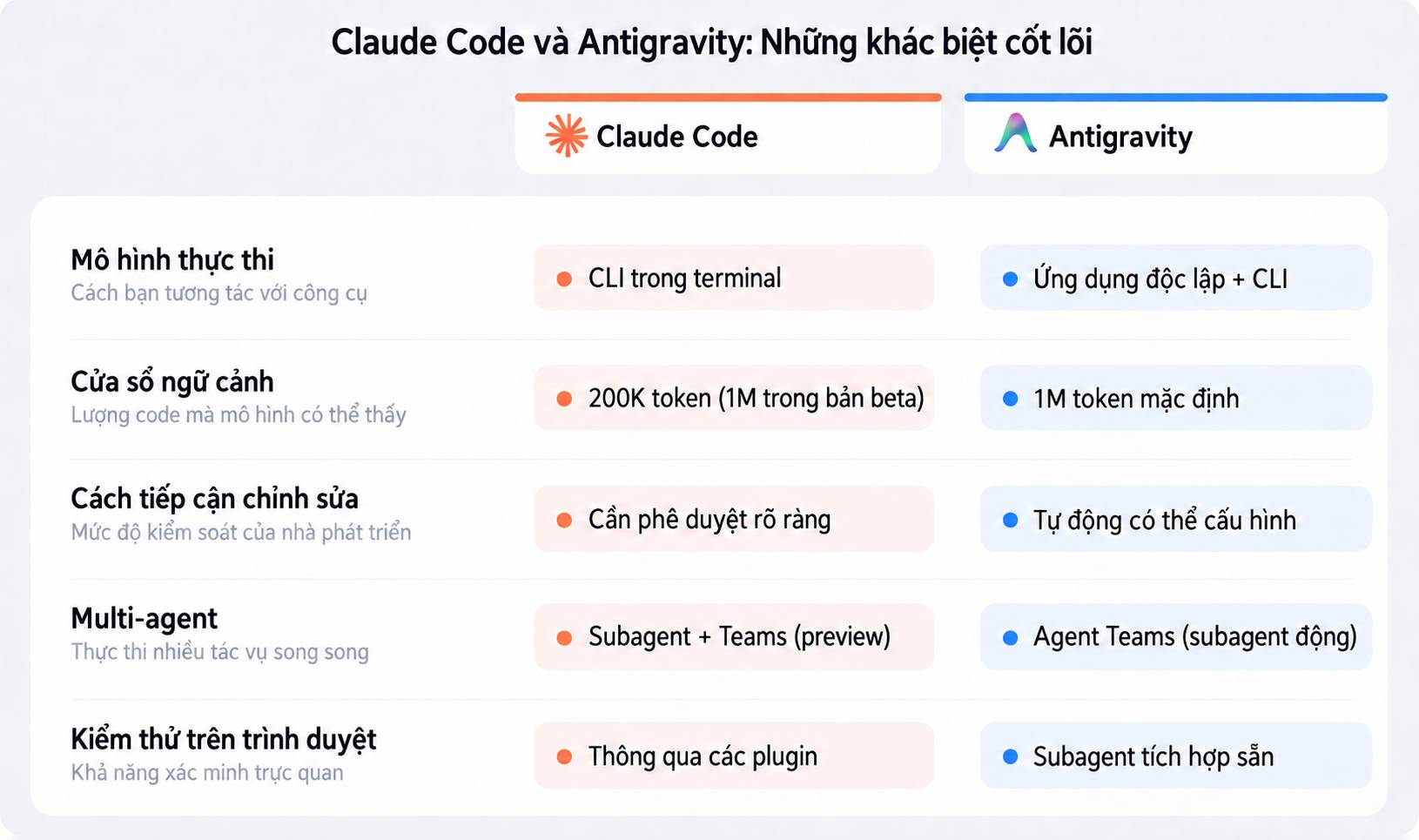
The comparison chart below shows how Claude Code and Antigravity stack up on execution model, context windows, edit methodology, multi-agent support, and browser testing capabilities.
Execution Model
Claude Code is terminal-first. You run it alongside your existing editor—it's a CLI tool with full support for flags, scripting, piping, and automation. Antigravity 2.0 is a standalone desktop application. But starting with Google I/O 2026, it also offers Antigravity CLI (written in Go) for developers who prefer terminal workflows. The desktop version replaces your editor; the CLI version runs alongside it.
This choice shapes your daily work. If your setup includes tmux, Neovim, or deeply customized terminal configurations, Claude Code integrates without touching anything you've already built. If you want an IDE with a visual file explorer, integrated browser testing, and a GUI, Antigravity's desktop app is the natural fit. And if you're a terminal person but want Antigravity's parallel execution, the CLI version covers that too.
Context Window Handling
Claude Code starts with 200,000 tokens and can expand to 1 million through the API (currently in experimental testing). It uses intelligent search to scan and map code on demand instead of loading everything at once. The CLAUDE.md file acts as persistent memory, keeping information across sessions.
Antigravity leverages the native 1-million-token context window built into Gemini 3.5 Flash. It stores persistent knowledge in .gemini/antigravity/knowledge/ and supports a Skills system—reusable instructions you can save for one project or use across all your projects.
Edit Methodology
Claude Code makes structured edits across multiple files, but it needs your explicit approval. Before it writes files, runs shell commands, or commits to Git, it shows you exactly what it plans to do and waits for confirmation. You stay in control, but that means you're watching closely the whole time.
Antigravity lets you dial up the autonomy level. At maximum autonomy, agents plan and execute across the editor, terminal, and browser without pausing for approval. The "Artifacts" system gives you a detailed record of everything that happened, so you can track progress. This means agents move faster when you give them full control—the tradeoff is coordination becomes messier, and sometimes agent outputs need adjustment.
Autonomy and Multi-Agent Support
Claude Code is primarily a single-agent tool, though it does support sub-agents with their own 200K token windows for complex tasks. A newer feature called "Agent Teams" (currently in research preview with Opus 4.6) lets multiple Claude Code sessions run in parallel and share a task list.
Antigravity was built for multi-agent orchestration from day one. At version 2.0, that's core to how it works: a planning agent can automatically spawn sub-agents during execution, letting the team scale fluidly as tasks get complex. Each agent gets its own sandbox but shares the project context. This means reviewers can see agent decisions without reading the entire chat history.
Browser Integration
Claude Code doesn't have a built-in browser. You can add browser capabilities through MCP (Model Context Protocol) servers or plugins, but it's not part of the core experience.
Antigravity comes with a dedicated browser sub-agent. Agents can spin up a full Chromium session to interact with websites, take screenshots, and record user interactions. For frontend work, this means visual verification happens inside the tool—no context-switching to a separate browser.
Code Generation and Refactoring Capabilities
Both tools go way beyond autocomplete. They plan, write, and verify code across your entire project. But their approaches differ, and you'll notice it on specific task types.
Building New Features
Claude Code excels when you describe a feature in natural language and let it plan the implementation. It analyzes your project structure, traces dependencies, and maps out which files need changes before writing any code.
Antigravity uses its multi-agent architecture. Parallel agents can tackle different parts of a feature simultaneously. For complex tasks, though, you may need more specific guidance than you'd give Claude Code.
Large-Scale Refactoring
Claude Code takes a sequential approach to refactoring across interconnected files. Its agentic search traces dependencies and applies changes step-by-step, synchronously.
Antigravity uses parallelization, deploying multiple agents across different parts of the refactor to finish faster. The coordination challenge is tougher, though: individual agent outputs sometimes need fine-tuning. Claude Code's sequential method makes it easier to track what changed and why—that's valuable when you're trying to understand a complex refactor.
Debugging
Claude Code's debugging workflow involves adding logging, reading output, tracking down root causes, and iterating. The "Extended thinking" feature in Opus 4.6 is especially useful when you're chasing complex dependency chains.
Antigravity weaves browser testing into the debug process. For UI bugs, a dedicated browser sub-agent can reproduce the issue visually, capture screenshots, and compare actual rendering against expected output. Claude Code can't do this natively.
Claude Code and Antigravity in Real Workflows
Comparing tools in theory matters less than seeing how they fit into actual work. Here's what different scenarios look like.
Solo Developer Projects
If you live in the terminal, Claude Code is lightweight: no IDE to install, no GUI to learn. The Pro plan at $20/month gets you started immediately.
Antigravity is free during preview and gives solo devs the ability to orchestrate multiple agents at once. The "Manager View" probably overkills personal projects, but the browser sub-agent is gold for anyone doing frontend work.
Startup Teams
Claude Code offers a Team plan at $25 per user per month. You get shared CLAUDE.md files, built-in GitHub Actions integration to auto-review pull requests, Slack integration, and SOC 2 Type II certification.
Antigravity doesn't have per-seat team pricing yet, though enterprises can access it through Google's Gemini Enterprise Agent Platform. Its parallel-running agents shine in sprint-based workflows. The Pro tier at $20/month matches Claude Code's starting price. But remember: it's a new product, and Google has a history of discontinuing tools—that's a risk factor worth considering.
Enterprise and Legacy Codebases
Claude Code has the more mature enterprise feature set with better documentation. It supports single sign-on (SSO), SCIM-based provisioning, audit logging, HIPAA compliance, and can deploy via Amazon Bedrock, Google Vertex AI, or Microsoft Foundry.
Antigravity is available to enterprise customers through Google Cloud's Gemini Enterprise Agent Platform. Companies like AirAsia, Deloitte, and WPP report using it in production. But specific security certifications matching Claude Code's SOC 2 and HIPAA compliance haven't been widely published yet.
For large codebases, Claude Code has more runway and better documentation about dependency tracing patterns and complex migration processes. Antigravity's larger context window means you can load an entire repository at once—but since it's new to the market, there's limited proof it handles massive codebases smoothly.
Rapid MVP Development
Antigravity is a solid choice for fast prototyping. The browser sub-agent catches UI issues early. Parallel agents build scaffolding for multiple project areas simultaneously. And the $20/month Pro plan keeps costs low during evaluation. Early 2026 users report spinning up complete working prototypes fast.
Claude Code takes a different approach. The sequential, approval-based process gives you a clear audit trail of every change. If your prototype becomes your first real release, that visibility and control might matter more than raw speed.
Ecosystem and Integration Capabilities
This is where the tools diverge most dramatically.
Claude Code runs as a CLI and plays nicely with any code editor. It has official VS Code extensions (including variants like Cursor and Windsurf), a beta JetBrains plugin, and direct support for terminal editors like Neovim and Emacs.
Antigravity ships on two platforms: a standalone desktop app and a Go-based CLI for terminal workflows. The desktop version imports settings from VS Code or Cursor on first setup and taps the Open VSX extension registry. Antigravity also offers an SDK, letting you embed AI agents into custom tools or CI pipelines.
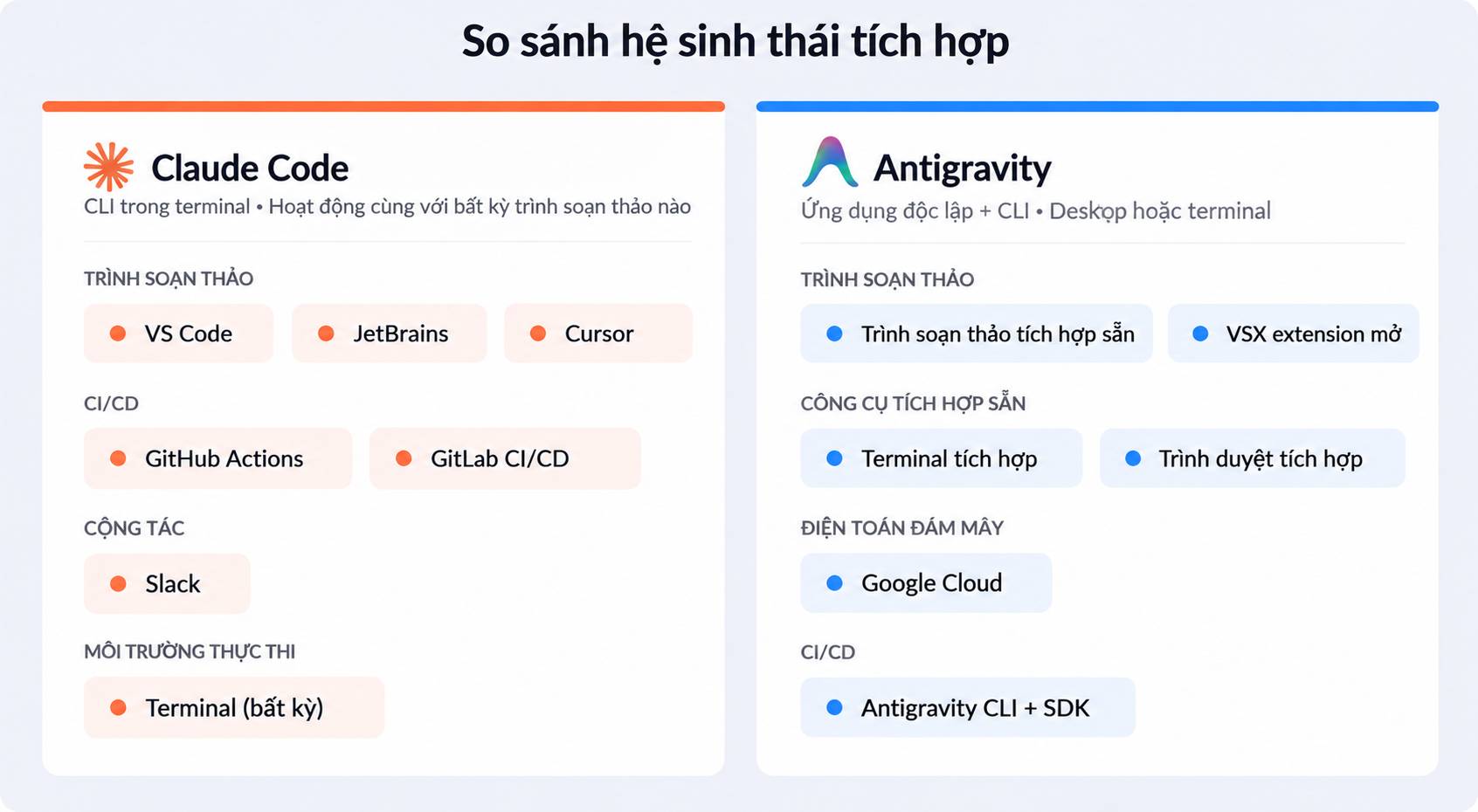
For Git and CI/CD, Claude Code is feature-rich: auto-create commits, manage branches, resolve merge conflicts, support worktrees, and officially integrate with GitHub Actions and GitLab CI/CD. Tag @claude in GitHub pull requests to trigger automated review workflows.
What's interesting here is Claude Code recently added Code Review—currently in beta for Team and Enterprise plans. This deploys a specialized team of AI agents for each PR, running deeper analysis than typical GitHub Actions workflows.
Antigravity handles CI/CD through CLI and SDK, letting AI agents automate pipeline configuration and run scheduled background tasks. Currently, it hasn't announced direct platform integrations matching Claude Code's GitHub Actions support.
On collaboration, Claude Code integrates with Slack and supports shared workspaces via Team and Enterprise plans. Antigravity's collaboration centers on comments in "Artifacts" and context-sharing between AI agents within a team. Official multi-user collaboration features are still in development.
Performance and Context Management
Both can handle large repositories, but they manage context and handle errors differently.
Claude Code uses "agentic search" to selectively read files as needed instead of loading everything upfront. Sub-agents provide isolated context windows for handling complex sub-tasks. Antigravity partitions context across agents, each working within Gemini 3.5 Flash's native 1-million-token window. Both can slow down during long sessions: Claude Code offers a /compact command to help manage this, while Antigravity lacks documented checkpoint or rollback mechanisms.
Both tools hallucinate, and the risk grows with longer sessions. Claude Code's failure modes are well-documented. Antigravity's are less clear since it's brand new. The real concern is you shouldn't trust either tool for self-verification on data integrity or security-critical logic.
Pricing Comparison
Both start at $20/month, but climb differently at higher tiers.
Claude Code: $20/month (Pro, Sonnet 4.6) → $100 or $200/month (Max tier, Opus 4.6). Teams pay $25 per user per month. Some developers have burned through a week's credits in a single afternoon—check your usage patterns before committing to Pro.
Antigravity is still free during preview, though rate limits may slow you down during peak hours. At Google I/O 2026, Google announced paid tiers: Google AI Pro at $20/month; new Google AI Ultra at $100/month (5x the Pro rate limit); and a top tier at $200/month (down from $250), with 20x the Pro limit. Double-check current pricing on both platforms' pricing pages before you decide.
The Bottom Line
Pick Claude Code if your workflow lives in the terminal, you need GitHub or GitLab CI/CD integration, or you're working on complex backend systems and legacy code—the sequential, approval-based approach gives you better control.
Pick Antigravity if you want built-in visual verification, prefer a GUI IDE, need parallel multi-agent execution, or simply want to test-drive a powerful tool for free.
The real answer? It depends on where you work, what you build every day, and how much control you need over AI actions. Both are evolving fast—these differences will shift meaningfully in just a few months.
Description: Head-to-head comparison of Claude Code and Antigravity. We break down architecture, pricing, integrations, and real-world use cases to help you pick t
Related Articles
- SUB/WAVE: Build Your Own AI-Powered Radio Station on Your Hardware
- Is AI-Powered Notepad Actually Worth It? Here's Why Developers Are Building Alternatives
- Are AI Companions Really Dangerous? We Might Be Asking the Wrong Question
- How to Use Perplexity AI for Research: A Complete Guide
- How to Extract Image Prompts from Any Picture for AI Generation

No Comment to " Claude Code vs Antigravity: Which AI Coding Assistant Should You Actually Use? "