OpenCode vs Claude Code: Which AI Programming Tool Should You Pick in 2026?

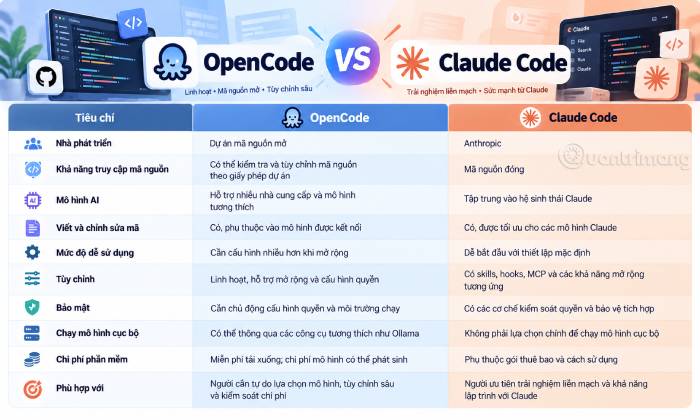
Two AI-powered coding tools are gaining serious traction with developers: OpenCode and Claude Code. Both can write code, debug errors, and automate technical tasks. But here's where they diverge — Claude Code delivers a seamless experience within Anthropic's ecosystem, while OpenCode flexes with open-source flexibility and multi-model support. The choice between them really depends on what you value: convenience or control.
So which tool wins in 2026 — OpenCode or Claude Code? If you want simplicity, solid coding performance, and built-in safety guardrails, Claude Code deserves serious consideration. But if you crave the freedom to pick your own models, manage costs carefully, and customize your development environment, OpenCode has the edge. This comparison breaks down both tools across features, usability, security, AI model support, and pricing to help you make the right call.
OpenCode vs Claude Code: Which AI Programming Tool Should You Pick?
- Understanding OpenCode and Claude Code
- Head-to-Head Comparison
- 1. AI Coding Performance: Claude Code Optimized for Claude Models, OpenCode Adapts Across Providers
- 2. Ease of Use: Claude Code Wins for Quick Starts
- 3. Flexibility: OpenCode Dominates Model Selection
- 4. Security: Claude Code Built-In Protections vs OpenCode's DIY Approach
- 5. Pricing: OpenCode's Pay-As-You-Go vs Claude Code's Predictable Plans
- 6. Extensibility and Collaboration: Both Have Distinct Strengths
- The Final Verdict: OpenCode or Claude Code?
Understanding OpenCode and Claude Code
Both OpenCode and Claude Code operate as agent-based AI coding assistants. Rather than just handing you snippets to copy-paste, these tools read your project files, execute commands, modify source code, and handle multi-step workflows triggered by natural language prompts. But their underlying architectures and approaches differ in meaningful ways.
What is OpenCode?
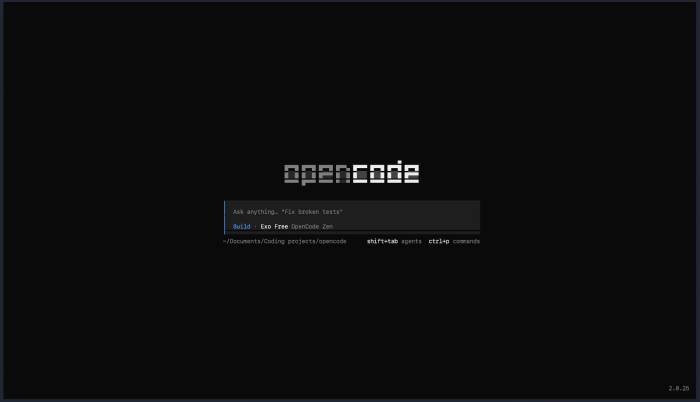
OpenCode is an open-source AI coding tool that lets you hook up various large language models (LLMs) from different providers. Want to use free models? Go for it. Prefer commercial APIs? Supported. Need to run models locally on your machine? OpenCode handles that too through compatible tools like Ollama.
The standout strength of OpenCode is its flexibility. You pick the model for each task, control execution permissions, and extend the tool however you need. The tradeoff? You'll invest time configuring and managing your setup. It's not a problem if you know what you're doing, but beginners might find the complexity overwhelming.
OpenCode fits developers with solid experience who want deep control over their AI-assisted workflow, or organizations that need flexibility in which model provider they use.
Strengths
- Open source and free to download.
- Supports multiple AI models and providers.
- Mix cloud-based and local models seamlessly.
- Customize and extend your workflow.
- Multiple model choices and cost control options.
Limitations
- Advanced setup takes more configuration time.
- Results depend heavily on which model you pick.
- Managing API keys and costs can get complicated.
- You handle security setup and permissions yourself.
- Free models might struggle with complex programming tasks.
What is Claude Code?
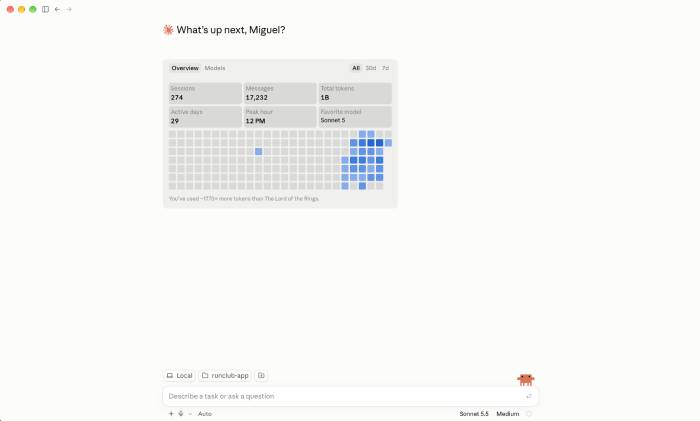
Claude Code is Anthropic's AI coding assistant, built on Claude models to help with writing code, analyzing projects, debugging, and tackling multi-step technical tasks.
The tool runs in your terminal, desktop apps, web interfaces, and IDE extensions on compatible editors. Claude Code includes permission management, action monitoring, and features to coordinate work across multiple agents. What's interesting here is how the product is positioned: Anthropic designed it as a complete, integrated experience rather than a collection of building blocks.
Claude Code's big win is a smooth user experience. Start with minimal setup, then expand by refining prompts, breaking tasks into smaller pieces, or delegating to specialized agents. You focus on the coding while the platform handles the infrastructure.
It suits developers who'd rather spend energy on programming than building and managing an AI infrastructure stack.
Strengths
- Quick to get started, ideal for focused coding work.
- Optimized for the Claude model ecosystem.
- Handles file reading, editing, and multi-step tasks.
- Built-in permission controls and security features.
- Multiple workflow expansion options available.
Limitations
- Locked into Claude's ecosystem.
- Capability varies with your subscription plan and rate limits.
- Less flexible than OpenCode for switching model providers.
- Costs can climb if you exceed your plan's capacity.
- You still need to review code and manage execution risks.
Head-to-Head Comparison
1. AI Coding Performance: Claude Code Optimized for Claude Models, OpenCode Adapts Across Providers
Both tools can handle similar tasks — writing functions, fixing bugs, analyzing code, making changes across multiple files. But the results heavily depend on the AI model driving the tool.
Claude Code: Extracting Claude's Full Potential
Claude Code builds directly around Anthropic's Claude models, letting you leverage model capabilities within a structured execution environment for coding tasks.
The tool excels at:
- Breaking down project structure and work processes.
- Writing new code from natural language descriptions.
- Identifying bugs and proposing fixes.
- Editing multiple files in a single task.
- Running checks or commands as needed.
- Planning refactors, restructuring code, and rolling out features.
Claude Code really shines with multi-step work where the AI needs to understand project context and coordinate multiple actions. You can split jobs into chunks, leverage expansion capabilities, and assign tasks to different agents when it makes sense.
One reality check: performance depends on which Claude model version you're using, your subscription's rate limits, and how well you write your prompts. Not every model tier offers the same capability or resource consumption.
OpenCode: Freedom to Pick Your Model Lineup
OpenCode doesn't lock you into a single model ecosystem. Connect compatible models from multiple providers, pick models based on task complexity, or blend cloud-based and locally-running models.
Picture this scenario: use a cheap model to explain code snippets, format files, or fix simple bugs. For complex work like designing system architecture, switch to a more powerful model. This strategy lets you manage costs and avoid vendor lock-in. The catch? Model capabilities vary wildly. A free model handles basic work fine but might struggle analyzing a large codebase or making a string of related changes.
Which Should You Pick?
- Go with Claude Code if you typically tackle complex programming tasks and want an integrated, relatively seamless experience.
- Choose OpenCode if you want to experiment with different models, control task distribution, and stay flexible about switching providers.
2. Ease of Use: Claude Code Wins for Quick Starts
One of the clearest differences is the setup overhead before you can actually start working.
Claude Code: Minimal Initial Configuration
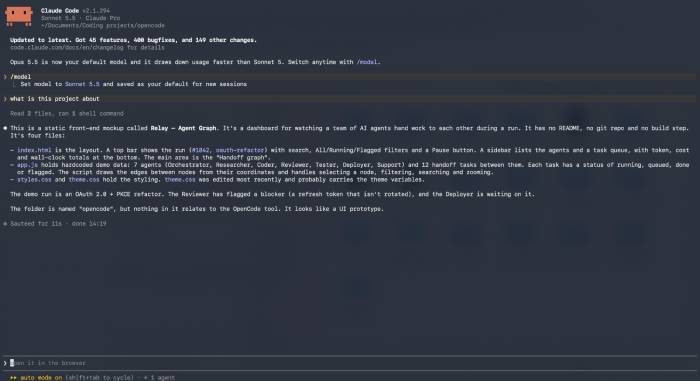
Claude Code lets you jump in by opening your project, setting your working directory, and describing the task with a prompt. The tool suggests a plan, reads relevant files, and makes changes based on your permissions. During work, you review changes, see results, and adjust your request if needed. Permission checkpoints help control sensitive actions.
That said, easy to start doesn't equal easy to master. With large projects, you still need skills in context-setting, defining success criteria, breaking down tasks, and reviewing AI-generated code quality.
OpenCode: Simple at First, More Management Later
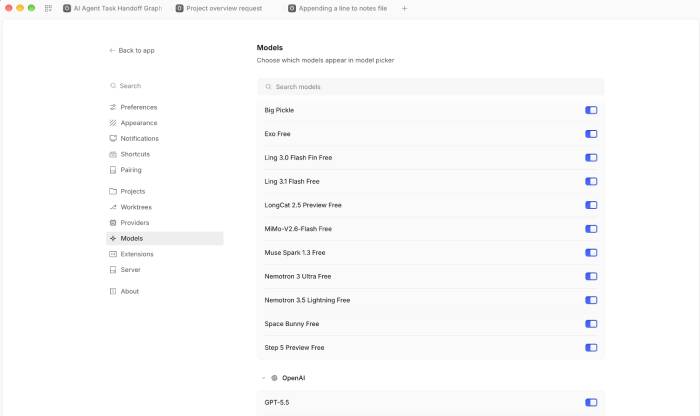
OpenCode gets up and running quickly too. Open a project folder, pick an available model, and start typing prompts. Complexity kicks in when you expand what you're doing. Connecting multiple providers might require separate API key setup. You need to track billing, check access permissions, and decide which model fits each task.
Local model runs or self-hosted web interfaces? That adds technical knowledge requirements.
Bottom line: Claude Code suits people who want to minimize setup time and focus on results. OpenCode works for people willing to invest in building their ideal environment.
3. Flexibility: OpenCode Dominates Model Selection
If you regularly work with different AI models, this matters a lot.
OpenCode supports connections to many compatible providers and models. Depending on your setup, pick models from OpenAI, Google, Anthropic, and other vendors. You can even combine cloud platforms with local model runners or intermediary services like OpenRouter.
Three major wins from this approach:
- Avoid single-vendor lock-in: Switch models when pricing, rate limits, or service quality change.
- Optimize spending: Use cheaper models for simple work and reserve powerful models for critical tasks.
- Customize your process: Build a model usage pattern that fits your personal or organizational workflow.
Claude Code concentrates on Claude models. This creates a consistent experience but reduces your ability to switch between different AI ecosystems directly.
Real talk: supporting a provider doesn't mean every model from that provider works with OpenCode. Check the current integration list, authentication methods, and usage policies.
4. Security: Claude Code Built-In Protections vs OpenCode's DIY Approach
When you give AI read-write access to your files and execution rights on your machine, security becomes non-negotiable. A sloppy prompt or unexpected action could corrupt code, delete data, or compromise your environment. The real concern is that most developers underestimate this risk.
Claude Code: Permission Enforcement and Action Blocking
Claude Code includes permission controls and built-in protections to prevent unwanted actions. Depending on configuration, you might need to approve sensitive operations before execution. Some features can inspect agent actions, limit permission escalation, and sandbox commands in controlled environments when conditions are met.
Still, your responsibility doesn't disappear. Review generated code, examine changes before applying them, and never grant broader permissions than necessary.
OpenCode: You Design and Enforce the Boundaries
OpenCode lets you customize permissions and execution workflows, but you own the security setup. Grant too much permission or use an untrusted model, and the agent can do damage within that permission scope.
Protect yourself by:
- Granting only necessary permissions for each task.
- Reviewing changes before accepting them.
- Using Git or version control to restore code if needed.
- Avoiding mysterious commands on machines with sensitive data.
Consider running experiments in virtual machines or isolated development environments when testing new models or setups.
Don't assume open-source equals perfectly safe, and don't assume built-in protections eliminate all risk. Real security depends on permissions granted, actual configuration, and how you operate the tool.
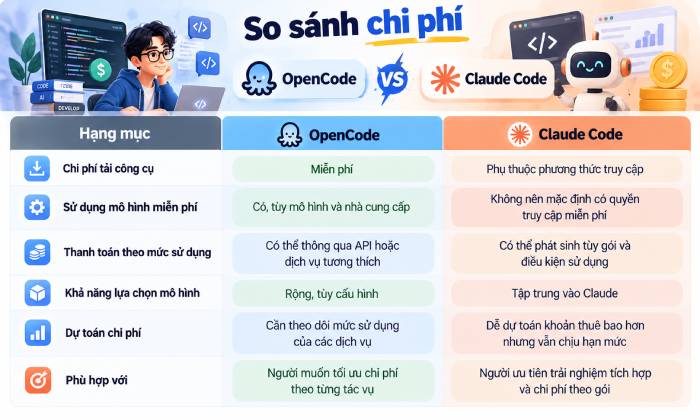
5. Pricing: OpenCode's Pay-As-You-Go vs Claude Code's Predictable Plans
Cost matters when you use AI coding tools regularly. But don't just compare software license prices — factor in model costs, rate limits, and setup time too.
OpenCode: Free Software, Variable Model Costs
OpenCode itself is free to download and use. AI model access is where costs arrive, depending on your provider and connection method.
Common options include:
- Free models: Good for experimenting or basic tasks, subject to service limits and conditions.
- Provider API keys: Pay directly per the provider's pricing and usage terms.
- OpenCode Go: A subscription plan mentioned at $10/month; verify current pricing and model availability.
- Zen: A usage-based payment service providing unified access to supported models.
OpenCode's strength is control — you choose your models and payment method. The challenge? Real costs are hard to predict across multiple providers or if you don't track token consumption carefully.
Claude Code: Subscription Tiers with Predictable Limits
Claude Code charges via subscription plans with corresponding model access. The Pro tier is cited at $20/month, while heavier usage might need Max tier or other payment options if available.
Subscription models make budgeting easier than juggling multiple API keys. The tradeoff is you're not unlimited. Rate limits, usage windows, and resource caps affect how much work gets done within your plan.
6. Extensibility and Collaboration: Both Have Distinct Strengths
Extensibility means the tool adapts to your existing workflow rather than forcing you to overhaul everything.
OpenCode benefits from open-source architecture and customization options. It supports extension methods like MCP, plugins, and permission frameworks (varies by version). Developers with technical depth can wire in external tools, build custom workflows, or modify the system.
Claude Code also supports extension mechanisms like MCP, skills, hooks, and subagents. These features connect outside tools, recycle instructions, and distribute work across agents. The integrated ecosystem means you can build sophisticated workflows without necessarily building the entire foundation yourself.
The difference: control. OpenCode suits people who want to tinker and manage the whole system. Claude Code suits people who prefer using Anthropic's pre-built ecosystem features.
For remote collaboration, both tools work in various configurations depending on interface type, version, and deployment method. But don't assume every web feature, remote control option, or agent coordination capability exists in every subscription tier. Check the official docs before architecting a workflow around specific features.
The Final Verdict: OpenCode or Claude Code?
There's no one-size-fits-all winner. The right choice hinges on your technical skills, budget, desired control level, and typical work patterns.
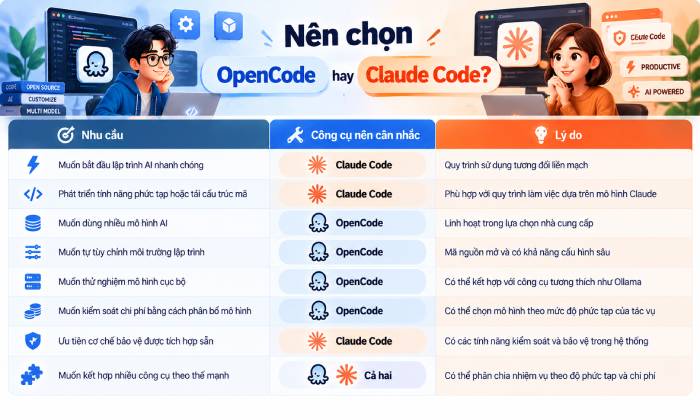
Here's the thing though: you don't have to pick just one. If your workflow allows, combining both tools can deliver better results.
For example, deploy Claude Code for work demanding deep analysis — planning features, hunting complex bugs, refactoring code. Let OpenCode handle smaller tasks using cost-appropriate models like explaining code, squashing simple bugs, or making narrow edits. This allocation uses resources more intelligently. The catch? Track the costs and results when switching between tools, and expect quality differences across models.
Smart teams don't dogmatically commit to a single tool. They evaluate based on actual needs, test both, and sometimes run them in parallel for different categories of work.
Description: Compare OpenCode and Claude Code features, ease of use, security, pricing, and flexibility to find the right AI coding assistant for your workflow.
Related Articles
- Build Parent-Teacher Meeting Slides in Minutes Using Canva AI
- Use Gemini to Instantly Summarize Google Forms Responses
- Google Photos AI Enhance: Automatically Improve Lighting and Color in Your Photos
- Google's DiffusionGemma: A Radically Different Approach to Text Generation
- 7 Classic Machine Learning Algorithms That Remain Essential in the AI Era

No Comment to " OpenCode vs Claude Code: Which AI Programming Tool Should You Pick in 2026? "