6 Red Flags That Reveal AI-Generated Images Every Time
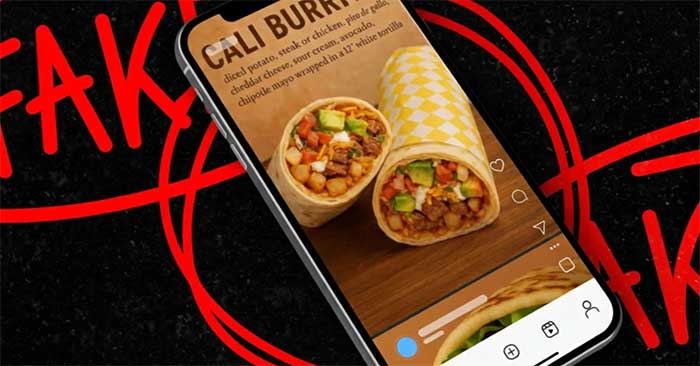
Artificial intelligence is everywhere now — and so are AI-generated images. They're flooding social media, Google Images, Pinterest, and advertising everywhere. We've even got a name for this phenomenon: "AI slop." The uncomfortable truth? It's only going to get worse. Distinguishing real from fake will become increasingly challenging as these tools improve at an alarming pace.
Image generation models are advancing incredibly fast. New tools like Gemini can produce images so realistic that the human eye struggles to detect them. In seconds, AI can edit, enhance, and generate perfectly polished images. This makes it harder than ever to trust what you see online.
So how do you spot an AI image? Here are six unmistakable signs to watch for.
1. Garbled or Unreadable Text
This is the oldest and easiest tell. When AI image generators first emerged, they struggled badly with rendering text.
Today, the technology has improved significantly — but text errors persist constantly. Whenever you spot text in an image (posters, book covers, t-shirts, anything with words), zoom in and examine it closely.
If the text is warped, misspelled, illegible, or nonsensical, you're almost certainly looking at an AI creation.
Even powerful tools slip up here. Often the image looks fine at first glance, but zoom in and you'll find letters that are misaligned or slightly wrong — this is classic AI behavior.

2. Extra Fingers or Anatomically Impossible Bodies
One of the most common failures in AI images involves human anatomy. Watch out for these typical glitches:
- Extra fingers
- Missing fingers
- Fused or webbed fingers
- Abnormal hand joints
- Arms that are too long or too short
- Disproportionate necks
- Extra limbs
- Distorted faces
- Misaligned noses or eyes
Even as AI models improve, these mistakes keep appearing — and they're dead giveaways of a fake.
3. Faces That Look Too Perfect or Plastic
AI-generated faces often have an unnaturally flawless quality. Look closely and you'll spot telltale signs:
- Skin that's impossibly smooth
- Eyes that glow unnaturally or look vacant
- Teeth that don't look organic
- Hair that's too perfectly styled
- Faces that resemble over-Photoshopped models
Many AI images look photorealistic but trigger an uncanny feeling. If something about a face feels "off," trust that instinct — it's probably AI.
4. Everything Is Too Perfect
Another giveaway is excessive perfection throughout the entire image.
Think of examples like:
- Food that looks like commercial advertising
- Logos that are suspiciously pristine
- Product photos that resemble digital illustrations
Many small businesses now use AI to generate promotional images instead of shooting real photos. This makes the images feel obviously fake — everything is too flawless, lacking natural imperfections and details.
If an image looks more like an illustration than a photograph, it probably is AI-generated.
5. Chaotic or Overly Complex Details
Some AI images suffer from too many bizarre details:
- Overwhelmingly complex backgrounds
- Illogical lighting
- Wrong or impossible shadows
- Repeating patterns
- Unrealistic light effects
These images often look visually "stunning" but lack authenticity. If an image feels too chaotic or resembles a video game scene rather than real life, it's likely AI.
6. Overly Smooth or Lacking Detail
Conversely, some AI images are too smooth and lack necessary detail.
Common examples include:
- Brick walls with no visible texture
- Blurry vegetation
- People that look painted rather than photographed
- Old photos that have been "restored" too smoothly
When AI processes low-quality or aged photos, it often strips away fine details and renders everything as if it were an illustration. If an image looks overly polished or unnaturally smooth, it's probably AI.
As AI images become harder to detect, staying vigilant matters more than ever. Keep these red flags in mind:
- Incorrect or garbled text
- Anatomically weird bodies
- Fake-looking faces
- Excessive perfection
- Chaotic or confusing details
- Over-smoothed or under-detailed images
Spotting fakes isn't always straightforward, but if something feels off, listen to your gut. You're probably right.
Bonus Tip: Use Free AI Detection Tools
It's time to move beyond visual inspection and subjective judgment. Let's explore how technology itself can help you identify AI-generated content.
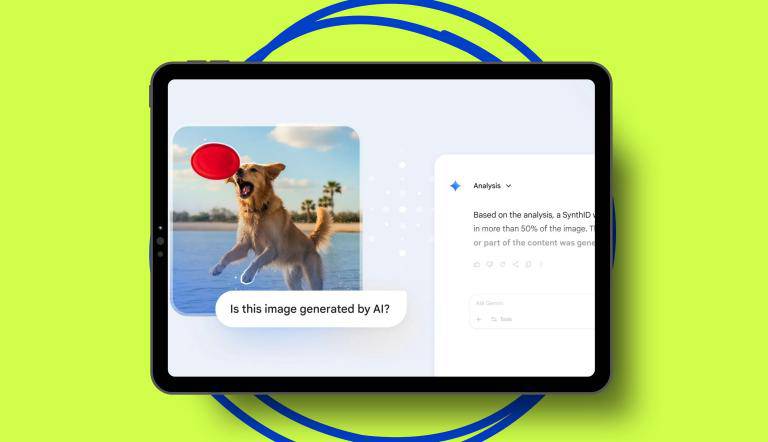
Google has released several free image verification tools that users love. On Android phones, you can use "Circle to Search" (long-press the Home button) to directly ask whether an image is AI-generated. Google Lens's "About this image" feature provides context about images, including whether it's an AI creation. If the image carries Google's SynthID watermark, these tools will detect and flag it.
Google's Gemini app lets you upload an image and ask directly: "Is this AI-generated?" Gemini scans for the SynthID watermark and provides feedback. Even without a watermark, Gemini can use its reasoning capabilities to make an educated guess.
These tools aren't perfect — sophisticated fakes can still slip through — but they're completely free and incredibly easy to use. Other AI detection tools exist, though many charge fees. Since no tool is 100% accurate, sticking with free options is your best bet.
Frequently Asked Questions
How accurate are AI detection tools?
Not always accurate. Testing shows they make mistakes regularly. When The New York Times tested five leading AI detection tools, the results were embarrassing — two of them identified an obvious AI image (Elon Musk kissing a robot) as authentic. The technology simply isn't foolproof yet.
How do you spot AI-generated videos?
AI videos have their own telltale signs, much like images do. The same principles apply: watch for unnatural movements, impossible physics, and anatomical inconsistencies. Pay special attention to hands, faces, and rapid scene changes — these are where AI struggles most.
Description: Learn how to spot fake AI images with these 6 telltale signs. From weird text to unnatural faces, here's what to look for.
Related Articles
- How to Disable Gemini in Chrome's Search Bar
- Best AI Image Upscaling Tools to Boost Your Photo Resolution in 2026
- Four Missing Features That Would Make NotebookLM Even Better
- ChatGPT vs Meta AI: Which AI Chatbot Actually Wins?
- Getting Started with Gemini Live: Your Guide to Voice Conversations with Google's AI

No Comment to " 6 Red Flags That Reveal AI-Generated Images Every Time "